




"We created a manual, but it’s not being used on site," "In the end, people say it’s faster to just ask a senior directly" — many companies face these kinds of issues. When internal manuals, which took time and cost to create, are not utilized, it leads to various problems such as decreased work efficiency, dependence on specific individuals, and increased training costs.
This article clearly explains five common reasons why internal manuals are not utilized, how to create manuals that are easy to search and use, the benefits of converting manuals to web format, and the actual steps for creating them.
- Table of Contents
-
- 1. Why Are Internal Manuals Not Utilized? 5 Causes
1-1. Ambiguous Purpose and Target Audience
1-2. Outdated Information Not Updated
1-3. Content Is Difficult to Understand and Use
1-4. Low Searchability, Unable to Reach Desired Information
1-5. Low Accessibility or Unawareness of Its Existence - 2. Five Ways to Create Manuals That Are Easy to Search and Use
2-1. Converting to Web Manuals
2-2. Introducing AI Utilization Tools such as RAG
2-3. Using Manual Creation Tools (CMS)
2-4. Information Design to Enhance Searchability
2-5. Utilizing Multimedia such as Videos and Images - 3. Moving Beyond Word and PDF Manuals! Benefits of Creating Web Manuals
- 4. Basic Steps for Creating Web Manuals
- 5. Summary
- 1. Why Are Internal Manuals Not Utilized? 5 Causes
1. Why Are Internal Manuals Not Utilized? Five Causes

Despite having prepared internal manuals, it is not uncommon for them to fall into a state where "they are not referenced on site" or "it is ultimately faster to teach verbally." First, let's review the five main reasons why manuals are not utilized.
1-1. Ambiguous Purpose and Target
If it is not clear "for whom" and "for what" the manual is intended, the content will lack consistency, resulting in a document that is half-baked for everyone. Manuals that do not clearly define their purpose and target users—whether they are training materials for new employees or operational manuals for veterans—tend to be judged on-site as "not relevant to me." Starting without narrowing down the purpose and target will cause inconsistencies in the level and granularity of the content, making the manual difficult for users to read.
1-2. Information is outdated and not updated
Although business flows and systems have changed, the manual has not been updated—this is a typical failure pattern seen in many companies. Once users feel that "what is written differs from the actual situation," they lose trust in the manual and stop referring to it. Without established update rules or responsible persons, even a carefully created manual will become obsolete over time.
1-3. Difficult to Understand and Use
Too many technical terms, verbose sentences, lack of charts and diagrams, and an unorganized structure—manuals with quality issues are naturally hard to utilize. When workers want to quickly refer to the manual during practical tasks but it takes time to understand the needed information, the manual tends to go unused. Manuals that "can be understood if read, but take time to read" often end up being bypassed with the reasoning that "it's faster to just ask," resulting in them not being utilized.
1-4. Low Searchability and Inability to Reach the Desired Information
Manuals that are thick PDFs or scattered across multiple Word files have weak table of contents and keyword search functions, making it cumbersome to find the necessary information. The process of opening files, checking the table of contents, and flipping through pages is a significant burden in a busy workplace. If it is judged that "asking is faster than searching," the manual will not be utilized.
1-5. Low Accessibility and Lack of Awareness of Its Existence
If manuals are stored in specific folders that are hard to locate, require access permissions to shared servers, or cannot be viewed from smartphones or on-site devices, there is essentially no way to refer to them. In the worst cases, the on-site staff may not even be aware that the manuals exist. No matter how high the quality of a manual is, if it cannot be accessed, it will not be utilized.
2. Five Ways to Create Manuals That Are Easy to Search and Used

Here, we introduce five specific methods to create manuals that are actively used. Rather than choosing just one, it is effective to combine multiple methods according to your company's situation.
2-1. Web Manual Conversion
By migrating Word or PDF manuals to HTML-based web manuals, you can dramatically improve searchability, updateability, and accessibility. Since they can be viewed with just a browser, they are accessible from devices such as PCs, tablets, and smartphones, and can be used both inside and outside the company. If you feel there are issues with your current manual management, web conversion is one of the most effective measures.
For more details on the benefits of converting to web manuals, please refer to "3. Moving Away from Word and PDF Manuals! Benefits of Creating Web Manuals".
2-2. Introduction of AI Utilization Tools such as RAG
In recent years, more companies have been building RAG (Retrieval-Augmented Generation) type AI chatbots that use internal manuals as information sources. Users can simply ask questions in natural language and receive answers based on the relevant sections of the manual, allowing them to retrieve information without needing to be aware of "which chapter or where it is written." Even users who struggle with searching can easily reach the answers, and it functions as a "go-to contact point for quick inquiries" on site.
2-3. Use of Manual Creation Tools (CMS)
By utilizing dedicated manual creation tools or CMS (Contents Management System), you can efficiently create and publish content following templates. They come equipped with essential operational features such as version control, approval workflows, and batch output to multiple media, making them suitable for collaborative production by multiple people. This is an effective option when you want to continuously operate while avoiding reliance on specific individuals.
2-4. Information Design to Enhance Searchability
Not only the introduction of tools but also the design of the content itself is important. Using titles and headings that consider search keywords, organizing categories and tags by business scenarios, and unifying variations in terminology—these steady efforts greatly influence the hit rate and usage rate of searches. The key is to design documents by anticipating the actual words users will use to search for information.
2-5. Utilization of Multimedia such as Videos and Images
For procedures and operations that are difficult to convey with text alone, combining screenshots, diagrams, and short videos is effective. This allows users to understand intuitively, which can shorten reference time and improve comprehension. Especially for operational procedures and complex flows, combining with videos brings the manual closer to a "no-reading-needed" format.
3. Moving Beyond Word and PDF Manuals! Benefits of Creating Web Manuals

Here, we summarize the main benefits gained by transitioning from Word or PDF manuals to web manuals. Web manualization is an approach that can simultaneously resolve many of the "reasons for non-use" mentioned in "1. Why Are Internal Manuals Not Utilized? Five Causes."
Improved Updatability
Web manuals allow you to edit only the parts you want to update and publish immediately. Unlike Word/PDF files, there is no need to replace and redistribute the entire file, ensuring that everyone always has access to the latest version. This makes it easier to maintain the freshness of information and prevents discrepancies between the manual and actual practices.
Improved Searchability
Full-text search within the browser and filtering by tags or categories become possible, allowing users to quickly reach the information they need. Additionally, analyzing search logs helps identify areas that are "frequently searched for but hard to find," aiding in discovering points for improvement.
Easy to enlarge and easy to read
The browser's zoom function and responsive design allow the display to be adjusted according to the user's device and eyesight. Charts and diagrams can also be enlarged by clicking, reducing the stress of having to zoom in on parts as with PDFs.
Easy to Access
Anyone can view it simply by sharing the URL, and linking from internal portals or chat tools is also easy. It supports access from smartphones and tablets, allowing users to quickly reach the necessary information even from the field or while on business trips.
Easier self-resolution and reduced support workload
Users can find and resolve the information they need on their own, leading to a reduction in inquiry volume. This also helps reduce the burden on help desks and trainers, contributing to improved productivity across the organization.
Even when receiving inquiries from users, you can share the URL of the relevant section, allowing you to provide users with pinpointed necessary information.
Easy collection of feedback
By installing evaluation features such as "Was this page helpful?" and comment forms, you can continuously collect user feedback. This leads to the discovery of improvement points and the establishment of a PDCA cycle, enabling an operation that "nurtures" the manual.
Related Links
What are the benefits of web-based manuals? Key points for creation are also explained!
4. Basic Steps for Creating Web Manuals
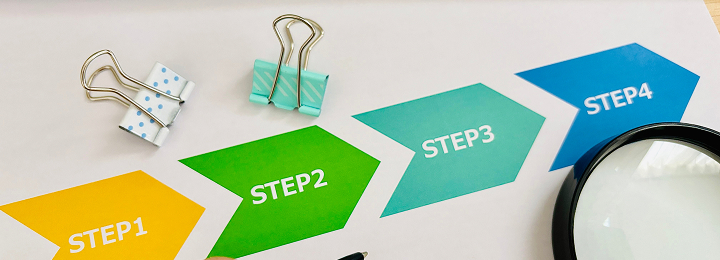
When creating or migrating a web manual, proceeding through the following 8 steps allows for smooth and thorough organization without omissions.
STEP1: Organize Existing Manuals and Extract Issues
Take inventory of the current manuals to visualize their content, usage status, and issues. Identify problems such as "duplication," "outdated information remaining," and "barely read," clarifying the starting point for improvements.
STEP2: Defining the Purpose and Users
Define who will use the manual, for what tasks, and at what timing. By concretizing the user persona and usage scenarios, the necessary level of detail and expression become clear, enabling a consistent design.
STEP3: Decide on the Manual Production Method
Choose the method that best suits your company from several options such as "designing from scratch," "using a CMS," or "converting existing Word manuals." Since the optimal solution varies depending on the schedule, budget, and operational structure, it is important to select according to the purpose.
STEP4: Structure and Framework Creation
Design the overall chapter layout, navigation, and category grouping. It is important to organize information from the user's perspective, keeping in mind ease of search and browsing. Design the flow with awareness of how users will reach the desired information from the top page.
STEP5: Establishing Manual Production Rules
Unify rules related to writing and editing, such as notation rules, glossaries, templates, heading levels, and handling of images and videos. This is an essential step to maintain consistent quality when multiple people are involved in creating and updating.
STEP6: Production
Content is created according to the established rules. The process of drafting manuscripts, creating charts and screenshots, reviewing, and revising is repeated to improve quality. Deciding on the review system from the beginning helps minimize rework in later stages.
STEP7: Start of Operation
Publish internally and inform users. Sharing access methods and usage scenarios can significantly impact initial usage rates. Also, make efforts to raise awareness on-site through briefings and sharing case studies.
STEP8: Feedback and Improvement
After publication, continuously review the content based on access analysis and user feedback. A web manual is not something you just "create and finish"; it demonstrates its true value through ongoing improvements. Designing an operational system for improvements in advance is the key to long-term utilization.
Related Links
5. Summary
This article organizes the reasons why internal manuals are not utilized from five perspectives, then explains how to create manuals that are actually used, the benefits of web manualization, and the actual creation steps.
・The reasons why internal manuals are not utilized are diverse, including unclear objectives for creation, outdated information, difficulty in understanding, and poor searchability and accessibility.
・By combining multiple approaches such as web manual conversion, AI utilization tools like RAG, CMS, information architecture, and multimedia usage, the utilization rate can be greatly improved.
・Web manuals excel in updatability, searchability, and accessibility, contributing to promoting self-resolution and reducing inquiry responses.
・When creating manuals, following a planned process from current situation analysis to feedback is the key to success.
In-house production of manuals and technical documents, as well as streamlining the creation process, are important challenges for many companies. Human Science provides one-stop support from creating Japanese manuals to English and multilingual translations. Leveraging our extensive experience and expertise in handling numerous manuals since 1985, we contribute to solving our clients' challenges.
If you are struggling with organizing internal manuals or transitioning to web manuals, please make use of Human Science's Web Manual Creation Service. From current situation analysis to design, production, and operation, we offer proposals best suited to your company's document management. Feel free to contact us.
![[Helpful Resource] Key Points for Engineer-Friendly Web Manual Production Using Markdown and Asciidoc](/en/wordpress/wp-content/uploads/2026/02/Markdown-Asciidoc-banner.png)




























































 Business Manual
 Operation Manual
 Manual creation
 Web Manual
 Director, Writer
 In-house Support
 Video
Video Manual
 Manual Creation
 One-Stop Service for Manual Creation
 Manuals and Documents
 Document Solutions for IT Companies
 Improving Manual UX through UX Writing
 Knowledge Management
 Jamstack
 GitHub/Markdown
 Return to the top of the page
 +81 35-321-3111[Tokyo Headquarters]
  Contact Us
 Resources