




Hello! I’m Y, a consultant. I usually provide consulting on the creation and improvement of manuals for companies in the manufacturing and IT industries. This time, I will introduce tips for efficient PowerPoint material creation, which many people use daily. The content can be applied in various situations, from student reports to business presentations, so please read until the end.
- Table of Contents
-
- 1. Challenges in Creating Materials Using PowerPoint
1-1. Time-Consuming
1-2. Misunderstanding the Purpose
1-3. Lack of Consistency in Format
1-4. Let's Organize the Issues!
- 2. Key Points for Solving "Quality" Issues
2-1. Straight to the Point! Key Points for Problem Solving
- 3. Key Points for Solving "Efficiency" and "Consistency" Issues – Utilizing MA Packet –
3-1. What is MA Packet?
3-2. Recommended Points of MA Packet
- 4. There Are Few Opportunities to Learn Key Points of Document Creation
- 5. For Consultations on Standardizing Document Creation Support, Contact Human Science
- 1. Challenges in Creating Materials Using PowerPoint
1. Challenges in Creating Documents Using PowerPoint

Suddenly, have you ever struggled with creating documents? There are probably no people who have never had any difficulties at all. But what exactly do we struggle with? Let's put common challenges into words.
1-1. Time-consuming
Have you ever felt that time flew by when creating materials using PowerPoint? If you are in a situation where spending a lot of time is allowed, it usually isn’t a problem, but in many cases, you are required to create materials within a limited time. Of course, thinking about the content takes a lot of time, but surprisingly, the following tasks also take effort.
- Deciding on the design
- Searching for appropriate materials
- Adjusting the placement and size of elements
These tasks can be especially burdensome for those who are not familiar with operating PowerPoint. Many people may have experienced spending hours without realizing it while trying to perfect a single slide.
1-2. Misunderstanding the Purpose
Have you ever finished creating a document only to be told by your boss or client that it "doesn't match the image" or "the direction is off," resulting in having to redo it? When you proceed with work while the purpose or goal is unclear, the risk of having to backtrack later increases. It’s disappointing to think, "I spent so much time creating this..."
1-3. Lack of Consistency in Formatting
A major issue that can arise is the "inconsistent formatting problem."
Nowadays, it is no exaggeration to say that documents are the "face of the company." With the increase in online business meetings, the demand for "materials that contribute to corporate branding" has grown more than ever. Nevertheless, when multiple people within an organization create documents, it is not uncommon to see cases where "fonts and font sizes are inconsistent," "color usage is inconsistent," and "layouts are inconsistent."
1-4. Let's Organize the Issues!
Let's organize the issues we've covered so far into three categories.
① Want to proceed with document creation efficiently and quickly (Efficiency)
② At the same time, want to achieve both clarity and quality (Quality)
③ Want to unify and standardize the format (Consistency)
So far, we have introduced common challenges in creating materials using PowerPoint. I believe many of you can relate to these issues.
2. Key Points for Solving "Quality" Issues

Now, I would like to explain how to solve these challenges.
2-1. The Key to Solving the Problem
First, let's solve the issues related to "quality." The solutions for "efficiency" and "consistency" will be explained in Chapter 3. But before that, let's address the challenges concerning "quality"!
The company I belong to, Human Science, specializes in creating manuals that "communicate clearly." In fact, many of the challenges related to "quality" share perspectives cultivated in the manual production field. Therefore, this time, based on points that manual writers are always mindful of, I would like to introduce some helpful tips for creating materials.
5 Key Points for a Good Manual
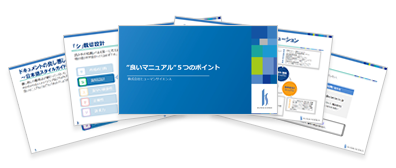
① Design the Concept
In manuals, we start by deciding the concept. Similarly, before creating materials, it is important to clarify the following three points.
・"For what purpose (Objective)": What is the purpose of the material?
Example) To have people feel the value of the services provided by Company XX
To have people purchase the services provided by Company XX
To have executives understand and agree on the necessity of XX…etc
・"What (Content)": What kind of information do you want to convey?
・"To whom (Audience)": Who is the reader?
② Create an easy-to-understand flow
Consider the order in which to present information so that the audience (reader) can understand it. In manual creation, the following sequence is considered a basic principle.
- From overview to details
- From whole to parts
- From simple content to complex content
- From familiar content to unfamiliar content
- Important information first
For example, in a proposal document, instead of starting directly with the details of the proposal, it becomes easier to understand if you explain background information such as "What kind of issues did the customer have that led them to inquire?" and "What are their requests?" Also, consider slide titles that allow the reader to infer the content. It is good to aim for titles that let the reader understand at a glance "what is written on the slide."
③ Create a Presentation with Clear Emphasis
An important aspect of creating materials using PowerPoint is to add visual emphasis. By making key information visually stand out, you can enhance the reader's understanding.
For example, you can add emphasis using methods like the following.
- Use a larger font size for important points
- Add color to parts you want to emphasize
- Clarify relationships and changes that are hard to convey with text alone using diagrams and graphs
How was it? These three points can be applied not only to PowerPoint materials but also to various reports and documents. Please feel free to use them as a reference.
At Human Science, we conduct in-house seminars (training) aimed at improving the quality and efficiency of document creation. Please feel free to contact us if you are interested.
3. Key Points for Solving the Issues of "Efficiency" and "Consistency" ~Utilizing MA Packet~

So, how can we effectively solve the issues of "efficiency" and "consistency"?
What we recommend is the use of tools. As an example, we would like to introduce a special tool developed by our partner company, MA-CREATE.
3-1. What is MA Packet?
MA Packet is a PowerPoint add-in tool that improves the efficiency of creating materials.
3-2. Recommended Features of MA Packet
① Easily and neatly arrange materials
When creating PowerPoint materials, a lot of time tends to be spent on gathering assets and arranging shapes.
With MA Packet, pictograms and photos are provided in an editable state. You can quickly insert the desired elements from a rich collection of materials and make fine adjustments using the editing features. Additionally, table templates are also available, allowing you to easily adjust periods and items with simple operations.
Also, when "the inserted images are slightly misaligned vertically" or "you want to space them out just right," you can perform tedious tasks like aligning positions or swapping objects with a single click using the arrangement feature.
It's appealing that you can smoothly collect materials, insert, and arrange them!
② Ability to Share a Unified Format
To enhance the consistency of PowerPoint materials, it is important to create an optimized format and share it within the organization. In particular, sharing the "font types and sizes," "color usage rules," "header and footer designs," and "basic layout patterns" is effective.
By using MA Packet, slides created by teams or individuals can be registered in the tool. This allows members other than the slide creators to select the most suitable format according to their purpose.
4. There Are Few Opportunities to Learn Key Points of Document Creation

There are various possible causes for these issues, but one of them might be the lack of opportunities to receive training in document creation.
Have you ever received training in document creation?
According to a certain survey, interestingly, most people answered that they were "not specifically taught." As mentioned earlier, despite the demand for quality and speed in document creation, the reality is that there are few opportunities to systematically learn efficient creation methods and effective design.
Q Who did you learn document creation from?
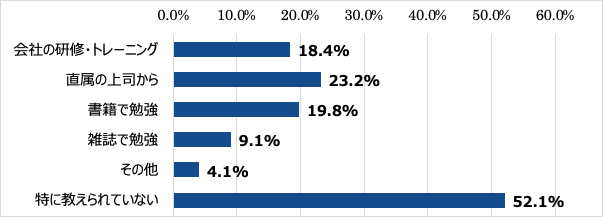
https://research.nttcoms.com/database/data/001928/
Human Science conducts in-house seminars (training) to standardize document creation. Please feel free to contact us if you are interested.
5. For Consultations on Standardizing Document Creation Support, Contact Human Science
There are various challenges in creating PowerPoint materials. However, by utilizing appropriate methods and tools, these challenges can be resolved. Human Science supports the introduction of the MA Packet, which helps solve these issues. Please feel free to contact us for detailed usage and consultation regarding implementation.
Human Science provides one-stop support from creating Japanese manuals to English and multilingual translations. We have a long track record of handling numerous manuals since 1985. If you have any of the following needs, please feel free to contact us.
- I want to improve existing Japanese and English manuals to make them easier to understand.
- I am considering creating an English manual and would like to proceed step by step from the Japanese manual.
- I want to translate and utilize Japanese manuals created in-house into English.
Feature ①:
Extensive manual production experience, mainly for large and global companies
Human Science has built a track record in manual production across a wide range of fields, primarily in the manufacturing and IT industries. We have worked with renowned companies such as "Docomo Technology Inc.", "Yahoo Inc.", and "Yamaha Corporation" as our clients.
Case Studies of Manual Production | Human Science
Feature ②:
From research and analysis to output by experienced consultants
The creation of business manuals is handled by our experienced consultants at Human Science. Our skilled consultants will propose clearer and more effective manuals based on their extensive experience and the provided materials. Additionally, we can create manuals even from the stage where information is not yet organized. The assigned consultant will conduct interviews to create the most suitable manual.
Manual Evaluation, Analysis, and Improvement Proposal Services | Human Science
Feature ③:
Not only manual creation but also emphasis on support for establishment
Human Science not only focuses on manual creation but also emphasizes the important stage of "establishment." Even after the manuals are created, we will support the establishment of the manuals through regular updates and manual creation seminars. Through a variety of measures, we will support the effective use of manuals in the field.
Manual Creation Seminar | Human Science
Thank you for reading until the end.
I hope this blog provides helpful tips for creating easy-to-understand manuals.
5 Key Points for a Good Manual


























































 Business Manual
 Operation Manual
 Manual creation
 Web Manual
 Director, Writer
 In-house Support
 Video
Video Manual
 Manual Creation
 One-Stop Service for Manual Creation
 Manuals and Documents
 Document Solutions for IT Companies
 Improving Manual UX through UX Writing
 Knowledge Management
 Jamstack
 GitHub/Markdown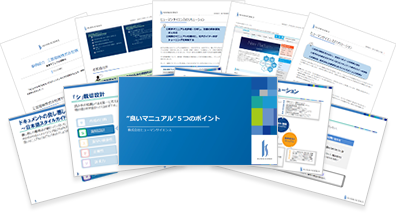
 Return to the top of the page
 +81 35-321-3111[Tokyo Headquarters]
  Contact Us
 Resources