


AI-powered Automatic Translation ToolMTrans Team 

- Localization: HOME
- Machine Translation
- MTrans Team
The MTrans Team is an automatic translation tool implemented by major global companies.
You can use it in scenes like this
It is used for a variety of purposes, from e-mail correspondence with local subsidiaries and business partners to translation of internal documents and proposal materials.
 Catalog
User Manual Internal Documents, Employees/Technical
Manual Emails with Local
Subsidiary and Clients Proposal Materials,
Press Releases Standardization of Internal and Product Terminology
 Instructions to the field,
Task management
- I want to translate the daily emails that occur internally and externally.
- I want to create emails and documents when dealing with overseas corporations.
- For information sharing on the internal portal site of a company with multinational employees.
- I want to translate product catalogs, user manuals, etc.
- I want to translate a large amount of documents in real time by integrating them with a system.
- I want to standardize the terminology that is inconsistently translated within the company.
Case Studies
96%
00000or more
Features of MTrans Team
1. Easy automatic translation for anyone with drag & drop
MTrans Team, a machine translation service, offers an intuitive interface that can be used immediately without any explanation.
The initial setup takes only 30 seconds.
As long as you have an internet connection, all staff members can use MTrans, whether they are in Japan or overseas.
Adding or removing users is also easy.
2. Becomes "smarter" the more you use it with AI and translation memory
When you purchase MTrans, we will prepare a "company-specific database (DB)" for you.
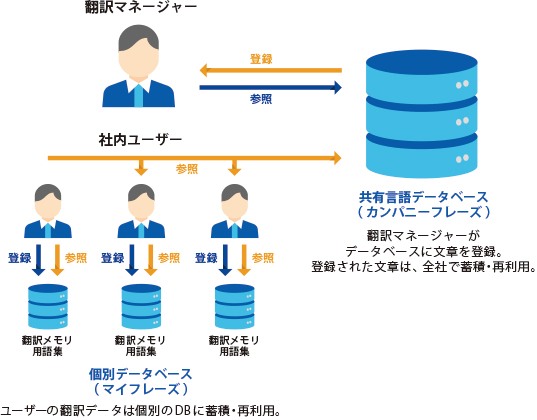
The more you use it, the more translation texts (industry terms, internal terms, etc.) will be accumulated, and the revised translation data will be automatically saved, shared, and reused in the DB.
As you operate it, the organization's common DB will accumulate and grow, leading to term standardization and improved work efficiency.
The foreign language support capability of the entire organization will be enhanced.
3. Glossary/phrasebook functionality allows for natural and fluent translations
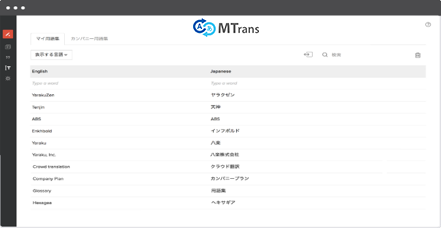
With the terminology and phrasebook functionality, you can achieve consistency in your sentences by registering words. It automatically reflects specialized terms and industry terms in the translated text. When you register in the phrasebook, the AI powered by MTrans will learn.
4. Reliable security

You can translate securely
Did you know that free translation tools pose a risk of information leakage? With MTrans Team, you don't have to worry about information leakage.
For example, unlike when using Google Translate in a web browser, there is no concern about the public sharing of translation data because of API connection.

We provide individual databases for companies and users
It is managed in individual databases for each company and user.
The data can be referenced, edited, and reused only by the user themselves and the members shared within the contracted corporation. It will not be viewed or reused by other users.

Cloud servers are provided by AWS (Amazon)
The server utilizes AWS provided by Amazon, which boasts the highest level of security among cloud servers. This infrastructure has been adopted by major Japanese financial institutions and can be used with confidence.

IP restrictions, private cloud, and more are available
We provide services such as IP restriction, private cloud, dedicated server, and also offer options for dedicated line connection and internet VPN.
5. Unlimited Use
The MTrans Team offers a flat-rate plan!
You can translate as much as you want without worrying about costs.
Compared to other automatic translation tools, it offers a high cost advantage.
| MTrans Team | Company A | Company B | |
|---|---|---|---|
| Pricing | ◎ For 5 users Initial cost 100,000 yen (first year only) + Account fee 144,000 yen (Unlimited characters) First year: 244,000 yen |
〇 5 people Account fee (first year only) 150,000 yen + Translation fee from 120,000 yen (up to 200,000 characters) First year: 270,000 yen |
△ Minimum 10 IDs Monthly fee: 80,000 yen, no initial cost, no character limit First year: 960,000 yen |
| Supported Languages | 27 Languages | 100 languages | 3 languages (other language options) Japanese ⇔ English, Japanese ⇔ Chinese only |
| Translation Speed | Good | △ | Good |
| Usability | Good | △ | Good |
| Maximum Character Limit Exists | Unlimited | Yes (Usage-based billing) | Available |
Case Studies
-
 Taiyo Nippon Sanso Corporation
Objective: Activation of communication with overseas
Implementation Effect: Establishment of a communication foundation using EnglishBy replacing it with MTrans Team, the utilization of machine translation tools has advanced, and communication with overseas has been revitalized. -
 Nippon Steel Corporation
Purpose: Streamlining communication with overseas partners
Implementation Effect: Reduction of resources allocated to translation tasksReducing the workload of confirming translated texts that was unavoidable with free translation software. Users can share dictionaries that were individually managed by everyone, and standardizing terminology also improves work efficiency. -
 Industry: IT
Purpose: Internal Document Translation
Implementation Effect: 30% Reduction in Translation Costs Headquartered in Singapore, all internal documents are in English. Successfully improved the efficiency of translation tasks that were previously dependent on individual skills.
We have been introduced to many other companies.96% of the companies that adopted our services continue to do so the following year.
Feature Introduction
Translation Engine
DeepL, Google, Microsoft
* Please contact us if you wish to use other engines.
 DeepL
DeepL Google
 Microsoft
Supported Languages
Japanese, English, Chinese (Simplified), Chinese (Traditional), Korean, Thai, Indonesian, Vietnamese, Malay, Tagalog, Hindi, Mongolian, Burmese, French, Spanish, German, Italian, Portuguese, Swedish, Arabic, Russian, Polish, Nepali, Dutch, Turkish, Romanian, Bengali Total 27 languages
*The supported languages may vary when using the DeepL engine.
Supported Files
 Word
Word Excel
Excel PowerPoint
 CSV
CSV PDF
PDF
* Also supports HTML and TXT files.
Price List
Detailed Price List (In addition, an initial fee of 100,000 yen is required)
| Starter | Small | Medium | Large | Extra Large | |
| Account Usage Fee | For trial use | For small and medium-sized businesses/departments | |||
| Monthly Price | ¥12,000 | ¥24,000 | ¥40,000 | ¥80,000 | ¥150,000 |
| Maximum number of users | 5 | 15 | 30 | 100 | 300*1 |
| Of which, maximum number of translation managers *2 | 1 | 3 | 5 | 10 | 20 |
*1 Please contact us separately if you have more than 300 users.
*2 The translation manager can publish and edit shared documents, phrase collections, and glossaries at the company or department level.
General users cannot edit shared data.
+
Data Storage Costs
| Monthly Price | Free | ¥10,000 | ¥20,000 | ¥30,000 |
| Number of Documents |
Unlimited | |||
| Number of phrases *3 |
100,000 lines | 300,000 lines | 500,000 lines | 1,000,000 lines |
| Glossary |
1,000 words | 3,000 words | 5,000 words | 10,000 words |
*3 The phrase refers to translation data saved in MTrans on a sentence-by-sentence basis. 100,000 lines correspond to approximately 7,500 pages of A4 size at 400 characters per page,
(calculated as 30 characters per line, totaling 3 million characters).
*4 The following options are also available.
・Addition of Genius MX dictionary (Japanese-English / English-Japanese) at 200 yen per user per month
FAQ
Account
- QWhat languages does it support?
- A
We support the following 27 languages.
Japanese, English, Chinese (Simplified), Chinese (Traditional), Korean, Indonesian, Thai, Vietnamese, Malay, Tagalog, Hindi, Burmese, Nepali, Mongolian, Arabic, Spanish, French, German, Italian, Portuguese, Russian, Swedish, Dutch, Polish, Turkish
- QWhat types of files can be uploaded?
- A
Compatible with Microsoft Office 2007 and later versions of Word (.docx), Excel (.xlsx), PowerPoint (.pptx), CSV (.csv), HTML (.html), and PDF (.pdf).
For PDF files, the downloaded file type will be Text (.txt).If you want to translate Word (.docx), Excel (.xlsx), and PowerPoint (.pptx) files before converting them to PDF, we recommend using MTrans for Office.
- QWhat are the character and size limits for uploaded files?
- A
Up to 50,000 characters or 45MB per file.
- QWhich browsers are supported?
- A
We support the following browsers:
Chrome, FireFox, Safari, Internet Explorer 11, Edge.
- QHow to connect with the API?
- A
It is possible. However, it will generally incur a fee. Please contact us through the inquiry form or reach out to our sales representative.
- QCan the text box be translated?
- A
It is possible. However, text boxes that overlap many times cannot be translated.
- QWhat MT engine do you use?
- A
This is GNMT (Google Neural Machine Translation).
- QCan I delete phrasebooks or glossaries all at once?
- A
Bulk deletion of glossaries and phrase collections is not supported. If necessary, please contact us via the contact page or get in touch with your sales representative.
- QCan I check the number of documents, phrases, and glossaries?
- A
The number of company documents, phrases, and glossaries, as well as the number of individual's personal documents, personal phrases, and personal glossaries, will be displayed on the company settings screen.
- QWhen will the number of documents, phrases, and glossaries be updated?
- A
Updated daily at 1 AM.
- QWhat is the price of MTrans Team?
- A
Please check here<it pos="end" x="2"/>.
- QWhat is the contract period?
- A
Only annual contracts are available.
- QAre translation data shared on Google or in the cloud?
- A
Because we connect via API, it will not be shared in the cloud as per our agreements with Google.
- QI have some questions about how to use the MTrans Team.
- A
Please contact us via the Contact page or reach out to our sales representative.
- QI would like to understand the basic features of the MTrans Team.
- A
- QWhat are company documents and company phrases?
- A
This refers to translated documents and phrases that are shared within the company. Users of "Translation Manager" can add and edit them.
- QHow do I share documents and phrases with members of the company account?
- A
Users of "Translation Manager" can share documents and phrases with general users by saving them.
- QHow can I share my My Documents and My Phrases?
- A
General user's My Documents and My phrases are not shared with other users.
- QHow to use company documents?
- A
Click the "Edit" button that appears at the top of the Company Document in order to use it.
- QHow to change the password?
- A
You can change your password by going to "Settings" > "Change Password".
- QWhat should I do if I forget my password?
- A
Click on "Forgot your password?" on the top screen (https://mtrans.science.co.jp/) where "Login" is displayed, enter the registered email address, and click on "Send a new password". A new password will be sent to your email, so please use it to log in.
- QHow to change or add users during use?
- A
You can add and delete users from "Company Settings". "Company Settings" is only visible to administrators.
If within the limit, you can click "Add User", enter the email address, and submit to add.
- QHow to change the administrator in the middle?
- A
You can change the administrator from "Company Settings".
- QHow can I increase the maximum number of registered users?
- A
Please contact us via the Contact page or reach out to our sales representative.
User Manual

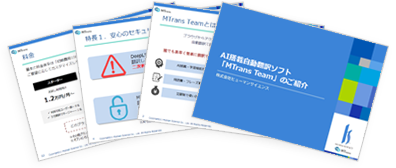
AI-powered machine translation tool available from 12,000 yenMTrans Team service materials
You can check the details of the MTrans Team AI translation software service, including features and case studies.
Please take a look.
- [Document Content]
-
- About MTrans Team
- Case Studies and Achievements
- Service Introduction
- Price
- Features
- FAQ
Event and Seminar Information
-
Register now!November 18, 2026 (Wed) & November 20, 2026 (Fri) 2:00 p.m. - 3:00 p.m.
-
Register now!November 10, 2026 (Tues) 2:00 p.m. - 2:40 p.m.
-
ClosedSeptember 8, 2026 (Tue) & September 9, 2026 (Thu) 2:00 p.m. - 2:45 p.m.
 Return to the top of the page

 +81 35-321-3111[Tokyo Headquarters]
  Contact Us
 Request for Information