


In manufacturing, there are many opportunities to translate documents in PDF format, such as technical documents, instruction manuals, and work manuals. However, many people may have experienced issues like "the positions of drawings and explanatory text shifted when translating the PDF as is," "the column widths of parts lists collapsed, making numbers and units hard to read," or "notes and captions got mixed into the main text." This article explains how to maintain layout when translating PDFs.
- Table of Contents
-
- 1. Why Does the Layout Break When Translating PDFs?
- 2. Five Methods for Translating PDFs and Their Ease of Maintaining Layout
- 3. Terminology Challenges to Watch Out for in Manufacturing PDF Translations
- 4. For PDF Layout Preservation & Terminology Consistency, Use "MTrans for Office"
- 5. Summary
- 6. FAQ
1. Why Does the Layout Break When Translating PDFs?

PDF is a format designed to fix the appearance and display it the same way in any environment. This characteristic is a factor that causes layout collapse during translation.
Examples of layout collapse
When translating PDFs, the following problems may occur.
The two columns are not distinguished, causing the texts from both columns to be mixed up and translated together.
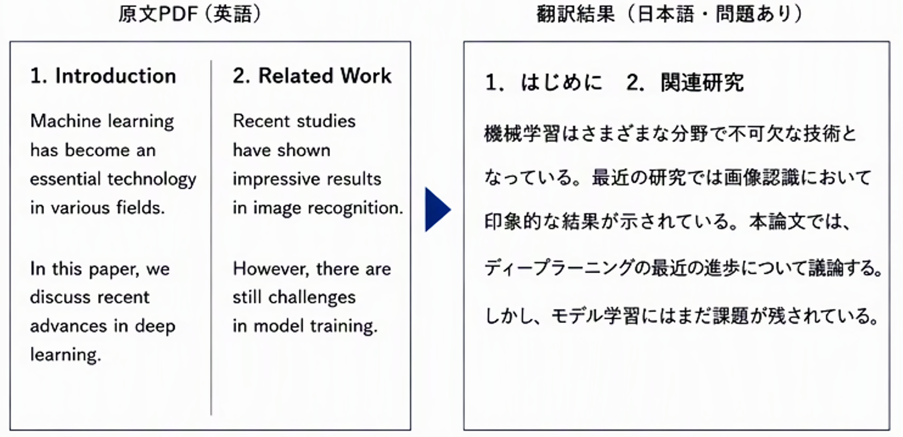
Captions of charts and photos get mixed into the main text.
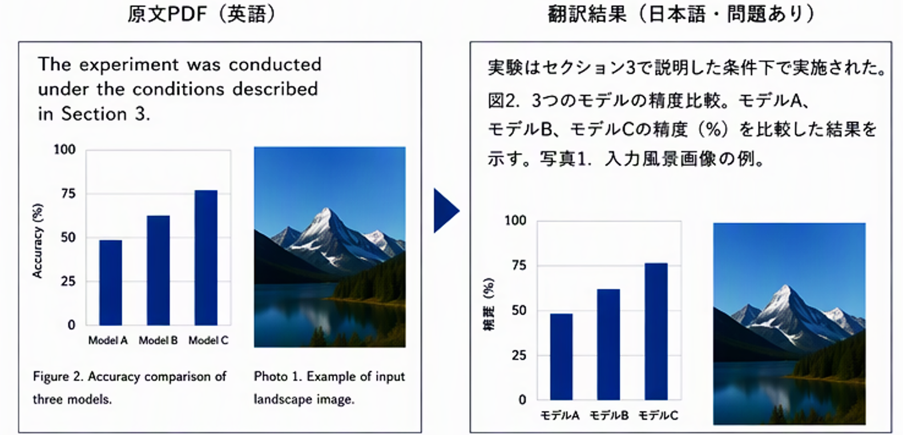
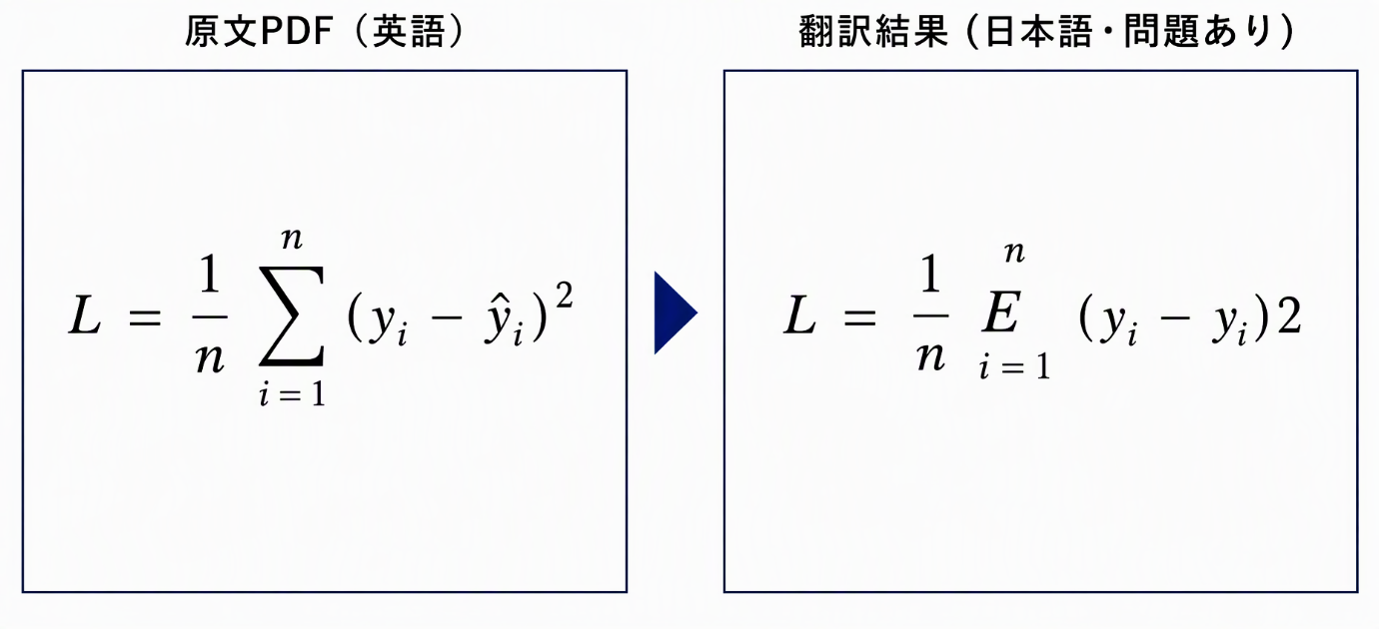
Mathematical symbols become garbled or missing. Superscript characters turn into normal characters.
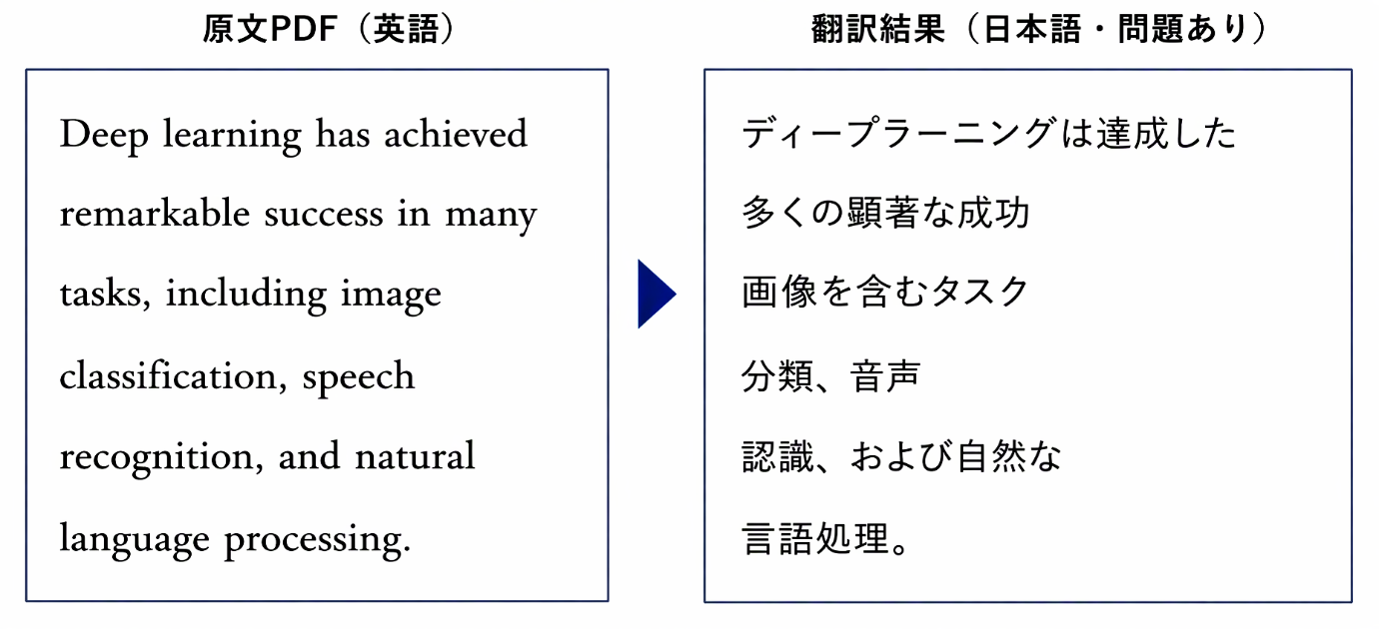
If there is a line break in the middle of a sentence, the sentence gets cut off there.
Causes of Layout Distortion in PDF Translation
The cause of such layout distortions lies in the following specifications of PDF.
- ・PDF is a format that fixes the appearance on the page and does not retain logical structures such as headings and paragraphs like Word does
- ・Because the reading order of multiple columns and the correspondence between drawings, tables, notes, and main text are not explicitly indicated, translation tools tend to misrecognize the order and grouping of the text
- ・Since drawing numbers, table numbers, captions, and notes are positioned based on location information, the boundaries and associations with the main text tend to be ambiguous
- ・Because the display area and placement of the text are fixed, when the amount of text increases or decreases due to translation, overflow or misalignment of characters is likely to occur
- ・Line breaks included in the text data to adjust appearance may cause translation tools to mistakenly interpret line breaks in the middle of sentences as sentence boundaries
2. Five Methods for Translating PDFs and Their Ease of Maintaining Layout
There are multiple methods for translating PDFs, and the ease of maintaining the layout varies depending on the method. Here, we introduce five representative methods.
Method 1: Use free online translation tools
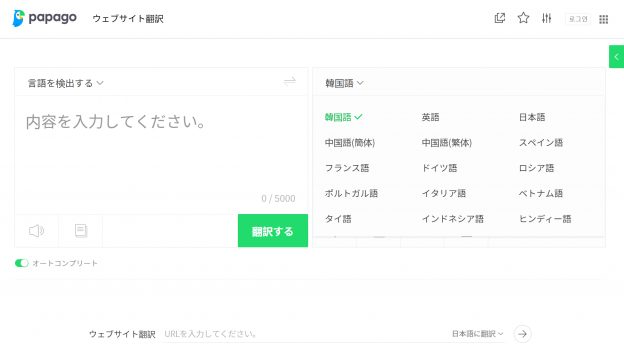
One option is to use online translation tools such as Google Translate or DeepL. You can upload PDF files directly for translation, or manually copy and paste text from the PDF for translation. While this method is easy to use, there are limits on the number and size of files that can be translated, and the original layout may not be preserved. Additionally, since handling confidential or unpublished documents may lead to information leaks, it is necessary to check internal regulations and security policies before use. This method is suitable for understanding the overview of publicly available information.
Method 2: Using ChatGPT or Microsoft Copilot Chat
This method involves attaching the PDF to ChatGPT or Microsoft Copilot and instructing it to translate. It is convenient for context-aware translation and summarization, but the output is basically text only, and the original PDF layout is not preserved. Since columns, tables, charts with captions, formulas, and line breaks may be disrupted, separate layout adjustments are necessary for deliverable documents.
Method 3: Use Adobe Acrobat Pro’s PDF Translation Feature
Adobe Acrobat Pro has a feature that allows you to directly translate and edit PDFs. Since it handles the original PDF, it is relatively easy to maintain the layout; however, a paid subscription to Adobe Acrobat Pro is required. Additionally, manual work is necessary to process complex layouts or large volumes of documents.
Method 4: Use Dedicated Tools That Can Preserve Layout
This method uses dedicated tools that can translate while maintaining the layout. Because it can preserve the placement of drawings, photos, tables, notes, step numbers, and more, it is the most practical option when you want to maintain the layout in PDF translation. "MTrans for Office," which will be mentioned later, also falls into this category.
Method 5: Outsource to a Translation Company
This method involves requesting a specialized translation company. At translation companies, professional DTP operators use dedicated tools to adjust the layout of the translated text, so you can expect high-quality results both in terms of translation accuracy and layout. Although it involves costs and lead time, it is suitable for public documents and documents requiring high precision. One example of an outsourcing partner is Human Science Co., Ltd., which handles translations across various fields including manufacturing, as well as post-translation DTP and layout adjustments.
3. Terminology Challenges to Watch Out for in Manufacturing PDF Translations

In addition to layout issues, PDF translation in the manufacturing industry faces another challenge: specialized terminology. Incorrect translation of part names, process names, standard names, and the like can not only hinder the reader's understanding but also lead to miscommunication of work procedures and product specifications. Therefore, greater accuracy and consistency in terminology are required than in general texts.
There is a risk that translation accuracy will decrease when there are many technical terms
Technical documents in the manufacturing industry contain many industry-specific and product-specific technical terms. General translation tools may replace these terms with translations that do not fit the context, resulting in inaccurate communication of meaning. Even the same term may have different appropriate translations depending on the process, such as design, manufacturing, or maintenance. Additionally, if translations vary between documents, the same parts or operations may be perceived as different. If technical terms are not translated properly, the workload for manual verification and correction increases.
How to Translate Technical Terms Accurately and Efficiently
To prevent mistranslations and inconsistencies in technical terms, it is important to organize key terms and approved translations within the document before starting the translation. By incorporating glossaries and past translation assets into the translation process and utilizing translation companies with specialized knowledge as needed, it becomes easier to balance quality and efficiency. Specifically, the following methods are recommended.
- ・Creation and updating of glossaries: Establish approved translations for product names, part names, process names, etc., to unify expressions throughout the document
- ・Requesting translation companies specialized in the relevant field: When it is difficult to determine translations in-house, leverage the expertise of translation companies with industry knowledge
By incorporating these measures, then cross-checking the source and translated texts after translation to verify important information such as numbers, units, model numbers, and warning statements, you can achieve a quality suitable for practical use. Furthermore, by continuously accumulating verified terms in the glossary, you can maintain quality while improving efficiency in future translations. Combining layout preservation with this kind of terminology management is the key to stable operation of PDF translation in the manufacturing industry.
4. For PDF Layout Preservation & Terminology Consistency, Use "MTrans for Office"
The solution that simultaneously addresses the two issues mentioned earlier—"layout disruption" and "technical terminology"—is "MTrans for Office" by Human Science Co., Ltd.
What is "MTrans for Office"?
"MTrans for Office" is an AI translation software that operates as an add-in for Microsoft Office products such as Word, Excel, PowerPoint, and Outlook. It allows you to execute translations with a single click directly from your usual Office screen, eliminating the need to launch separate translation software or perform copy-and-paste operations, which makes it easy to adopt.

Translation is possible while maintaining the PDF layout
MTrans for Office is equipped with a PDF translation feature that supports layout preservation. It can translate PDFs while maintaining the layout, including drawings, photos, tables, notes, captions, and more, greatly reducing the effort required for layout adjustments after translation.
Terminology Unification is Possible
Equipped with a glossary function that allows you to register product names, part names, and technical terms, it enables consistent translation of industry-specific terminology in manufacturing. Since the terminology is unified throughout the entire document, it reduces the effort required for manual verification and correction afterward.
5. Summary
Because PDF is a format designed to reproduce printed images, it has the characteristic of being prone to layout disruption during translation. There are the following five options for translating while maintaining the layout.
- 1. Use of free online translation tools
- 2. Using ChatGPT or Microsoft Copilot
- 3. Using Adobe Acrobat Pro’s PDF translation feature
- 4. Using dedicated tools that can preserve layout (e.g., MTrans for Office)
- 5. Outsourcing to a translation company (e.g., Human Science Co., Ltd.)
For manufacturers who want to maintain layout and unify technical terminology, we recommend "MTrans for Office." It enables high-quality translations that preserve layout and unify terminology within the familiar Office environment. Additionally, if handling it in-house is difficult or if high quality is required for public documents, please also consider outsourcing to Human Science Co., Ltd., which supports translation, DTP, and layout adjustments.
Related Services
>Office Translation Software "MTrans for Office" That Can Translate While Maintaining PDF Layout
6. FAQ
- QWhy is layout distortion likely to occur in PDF translation?
- QHow should I choose a method for translating PDFs?
- QWhat should I be careful about when translating PDFs with ChatGPT or Microsoft Copilot?
- QWhat is necessary to maintain quality in PDF translation for the manufacturing industry?



















 Return to the top of the page

 +81 35-321-3111[Tokyo Headquarters]
  Contact Us
 Request for Information