




- Table of Contents
-
- 1. What is ChatGPT (Generative AI)? Basic Procedures for File Translation
- 2. Four Challenges Faced in File Translation Using Generative AI like ChatGPT
- 3. Accuracy and Advantages of ChatGPT Translation
- 4. Tips and Concrete Examples of Prompts to Dramatically Improve Translation Accuracy with ChatGPT
- 5. Hybrid Use of Generative AI and Dedicated Tools as the Optimal Solution for PDF Translation
- 6. Precautions When Using ChatGPT and Machine Translation
- 7. Security Measures
- 8. Frequently Asked Questions About AI Utilization in PDF and File Translation
- 9. Summary
1. What is ChatGPT (Generative AI)? Basic Procedures for File Translation
ChatGPT is an AI chat service that was released by the U.S. organization OpenAI in 2022. It uses a large language model (LLM) powered by artificial intelligence, and its main feature is the ability to converse like a human. Similar services include Anthropic's Claude, Google's Gemini, and Microsoft's Copilot.
Microsoft has partnered with OpenAI to offer Copilot, a service based on ChatGPT. Microsoft has also integrated Copilot into Microsoft 365 and Windows 11.
ChatGPT is available for free, but by subscribing to a paid plan called ChatGPT Plus, you can access features such as the more accurate o1/GPT-4.5 model, Deep Research which autonomously searches the web and creates reports, and Custom GPT which allows you to create your own ChatGPT.
・How to Translate Office Files, PDFs, and Emails with ChatGPT
By entering "Translate to [language]" into ChatGPT, you can translate the content of Word, Excel, and PowerPoint files, PDFs, and emails by copying and pasting the text. You can specify languages such as English, Japanese, and Chinese. When translating, you can specify the purpose of the document with prompts like "Translate this website text to Japanese," "Translate this marketing document to English," or "Translate this technical paper to Chinese." This ensures that appropriate terms and stylistic expressions are used for each document.
・How to Proofread and Brush Up After Translation
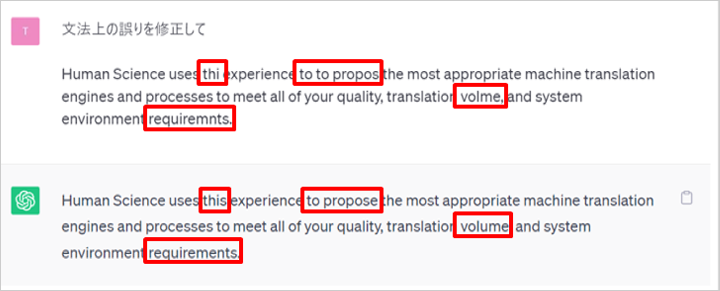
ChatGPT can also be used for proofreading and revising text after translation. When you want to make fine adjustments after translating manually or using another automatic translation tool, write prompts like the following and paste the text.
・"Correct the grammatical errors"
・"Point out the grammatical errors"
This allows ChatGPT to instantly detect and correct typos, unnatural expressions, and grammatical errors.
2. Four Challenges Faced in File Translation Using Generative AI like ChatGPT
Generative AI such as ChatGPT has excellent writing capabilities, but when attempting to translate entire files like PDFs, Word documents, or PowerPoint presentations in practical work, it faces several serious challenges. If these are not understood, it can lead to unnecessary manual work and decreased operational efficiency.
・Stress from Layout Collapse
In translating PDF and PowerPoint files, maintaining the original layout is just as important as the quality of the translated text. However, many common generative AIs excel at extracting and processing the textual information within files but are extremely poor at outputting while preserving design information and coordinate data that indicate where the text is placed. As a result, when you look at the output after translation, neat slides and tables may be completely broken down into mere bulleted text, and you could end up spending hours restoring it back to the original design.
・Omissions and Lack of Consistency
When long documents (such as manuals, contracts, academic papers, etc.) are given to generative AI for translation, the latter parts may be cut off midway, or the AI may arbitrarily summarize or omit parts of the text. This is due to the AI’s limitation on the amount of information (token count) it can process at one time, as well as its tendency to skip content it deems unimportant (a type of hallucination). In contracts and technical specifications, where word-for-word accuracy is required, omissions of entire paragraphs pose a critical business risk.
・Instability in File Loading and Output
When directly uploading PDF or Office files to generative AI, system errors such as "Failed to load file" or "Unsupported format" often occur. Even if you are fortunate enough to have the file loaded and translated, the mechanism to cleanly download and export the translated file in its original format (such as Word or PDF) is underdeveloped, which can hinder smooth business workflows.
・Security Risks and Information Leakage
When using free web chat services to translate confidential documents or company-secret PDF files, there are many cases where the uploaded file contents and text data are reused as data for improving or further training the AI model. Inputting customer lists containing personal information, unpublished patent technical documents, or corporate confidential contracts directly into free generative AI poses a serious compliance risk (information leakage).
3. Accuracy and Advantages of ChatGPT Translation
・ChatGPT's Translation Accuracy
We compared the translation accuracy of ChatGPT (gpt-3.5-turbo, gpt-4) with DeepL between Japanese and English using an evaluation metric called BLEU, divided by business field. The results are as follows.
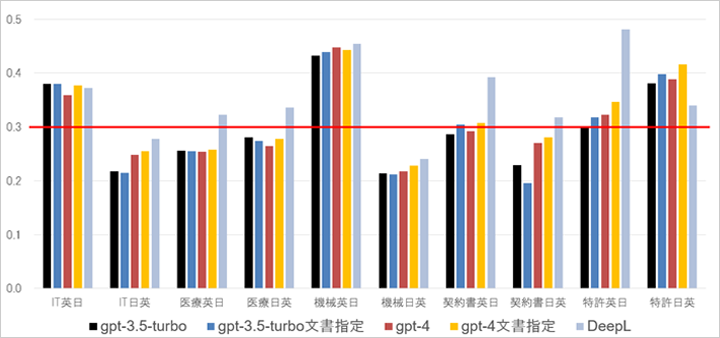
The translation fields are listed below the graph in the order of IT, medical, automation, contract, and patent, first from English to Japanese then from Japanese to English. The BLEU value is shown on the left. The key at the bottom identifies the automatic translation engines, with gpt-3.5-turbo and gpt-4 each having a "document-specific" variant. These translations were made by specifying the document type in the prompt. For example, when testing for the IT field, instructions given to ChatGPT requested translation for an IT-related document. For context, when the BLEU value exceeds 0.3, it is believed to improve the efficiency of the translation process. To indicate that, a red line has been drawn at 0.3.
DeepL has high translation accuracy overall, but ChatGPT excels in IT translations from English to Japanese and patent translations from Japanese to English. When comparing different versions of ChatGPT, gpt-3.5-turbo may excel in some fields, while gpt-4 excels in others, indicating that gpt-4 is not necessarily superior for all purposes. Additionally, specifying the document type in ChatGPT prompts does tend to improve the translation accuracy.
Please refer to the following blog post for specific translation examples.
"What is ChatGPT's translation ability?"
Free Download
・Benefits of Translating with ChatGPT
ChatGPT is capable of high-precision natural language processing. It understands the context and meaning of sentences and uses appropriate terms and expressions based on the context.
ChatGPT supports multiple languages, as it has been trained on multilingual data from the internet. It supports European languages including English, as well as many Asian language, and Arabic. Specifically, it supports Spanish, French, German, Italian, Portuguese, Dutch, Russian, Chinese (simplified and traditional), Korean, Thai, and Indonesian, in addition to English and Japanese.
Beyond that, you can adjust the translation by providing additional instructions or information in the prompts. For example, specifying the document type improves translation accuracy. You can also specify specific translations for certain terms. Furthermore, you can specify the intended audience to encourage the system to use vocabulary and expressions that are tailored to the readers.
To customize the translation using conventional machine translation engines, it is necessary to prepare a vast amount of bilingual text pairs and perform training on the model, which requires time and money. However, with ChatGPT, you can generate the desired translation simply by adjusting the prompts. With ChatGPT, you can easily prepare your own unique translation engine.
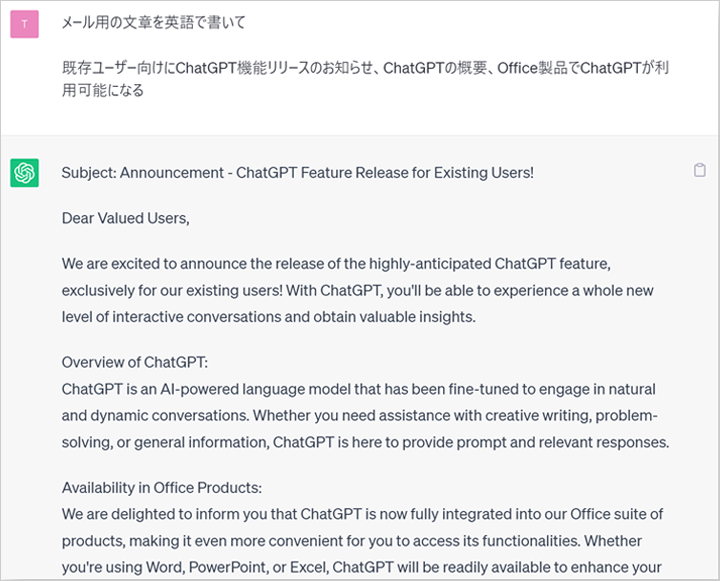
ChatGPT is also known as a "generative AI" and can literally generate text. With this feature, you can write text in the target language beyond just translation of the source. In the following example, we listed the relevant information in Japanese and then instructed the system to "Write an email in English," resulting in the complete text of an English email. Whether writing in your native language or a foreign language, drafting emails takes a significant amount of time, but using ChatGPT can greatly reduce the time spent on email composition.
4. Tips and Concrete Examples of Prompts to Dramatically Improve Translation Accuracy with ChatGPT
A prompt is an instruction to ChatGPT. A prompt is a statement that directs what kind of response is expected from ChatGPT. Below are points to effectively create prompts.
・7 Points for Creating Translation Prompts
●Make Instructions Specific
Specify the translation language, tone and style, character count, etc. For example, you might say, "Translate from English to Japanese, in a formal tone, within 200 characters."
●Example Output
By presenting an example, you can clearly convey the desired format. For instance, 'Input: If you have any questions, please let us know. Output: If you have any uncertainties, please let us know.' This allows you to adjust the level of expression and politeness.
●Specify the type and characteristics of the document
Clearly state the type of document being created (e.g., business report, blog article, technical manual) and its characteristics (e.g., use of specialized terminology, casual expressions).
●Specify the Target Audience
By specifying the attributes of the audience (e.g., professionals, general consumers, students), it helps in selecting the appropriate tone and content.
●Add headings to clarify the original text and instructions
Headings are added to distinguish between the original text and instructions, making the structure clear. For example, headings such as "Original Text" and "Instruction Content" are used.
●Specify Notation Rules
Specify the notation rules to be used (e.g., Japanese honorifics, English APA style) to aim for a consistent output.
●Further modifications to the translated output
It is also possible to give instructions for further modifications to the initial output. For example, you can add instructions such as, "Please make this part more concise" or "Please replace this word with another term."
・Ready to Use! Practical Translation Prompt Examples
Based on the points above, here are some example prompts for translation using ChatGPT.
Prompt Example 1: Translate English to Japanese
# Translation Request
Please translate the following # original text into Japanese. Please follow the # notation rules and # additional instructions for the translation.
# Notation Rules
– Product names and proper nouns (e.g., Microsoft, Apple) should not be translated and should be written in Katakana
– The long vowel sound at the end of Katakana words should be omitted (e.g., "computer" → "コンピュータ")
– For personal names, insert a half-width space between the surname and given name (e.g., "John Smith" → "John Smith")
– Technical terms should be translated accurately, and the original English term should be included in parentheses as necessary
# Intended Audience
Please aim for polite and concise expressions in documents intended for business professionals.
# Original Text
[Enter English text here]
# Additional Instructions
– Please keep the length of the text approximately the same as the original
– Maintain the same format for bullet points and paragraph structure as the original
– After translation, please check for any particularly unnatural expressions
Prompt Example 2: Translate Japanese Email to English
# Translation Request
Please translate the following Japanese business email into English.
# Document Types and Characteristics
– Type: Business email to important clients
– Characteristics: Uses polite and professional expressions, concise and clear content
# Style and Expression
– Polite Business English (Formal)
– Include expressions that show respect
– Use polite requests that are not too direct
# Output Format
– Clearly distinguish between Subject and Body
– Include appropriate greetings and closing for business emails
– Convert Japanese honorific expressions to appropriate polite expressions in English
# Input Text
## Subject: Please send the invoice.
## Body:
[Japanese email body goes here]
# Output Example (Reference)
Subject: Request for Invoice Submission
Dear [Name],
We appreciate your continued support and cooperation.[Translation of email body]
We look forward to your prompt response.
Sincerely,[Your Name]
Prompt Example 3: English-Japanese Translation of Technical Documents
# Translation Instructions
Please translate the following Japanese technical document into English.
# Document Characteristics
– Type: Technical Manual/Specification
– Field: [Specific fields such as IT/Manufacturing/Healthcare]
– Audience: Experts and engineers in the relevant field
# Translation Style
– Concise and clear English
– Use of industry-standard terminology
– Appropriate use of passive voice
– Accurate expressions that eliminate ambiguity
# Notation Rules
– Use SI Units
– Insert a space between the number and the unit (e.g., 10 kg)
– Abbreviations should be spelled out in full upon first use (e.g., CPU (Central Processing Unit))
# Original Text
[Technical document in Japanese]
# Post-Translation Review Items
After translation, please check the following points:
1. Are the technical terms translated accurately?
2. Are the procedures and instructions clearly conveyed?
3. Is the structure of the text logical?
4. Is there overall consistency?
5. Hybrid Use of Generative AI and Dedicated Tools as the Optimal Solution for PDF Translation
So, is generative AI like ChatGPT unnecessary for document translation? The answer is "No." Generative AI excels in creative and flexible text processing tasks that dedicated translation tools struggle with, such as softening expressions (tone adjustment), summarizing, and rewriting with specific nuances. By combining the strengths of each tool, a hybrid workflow that maximizes translation speed and quality is currently the optimal solution for translating PDF files.
1. Translation Process: First, use a dedicated AI automatic translation tool to translate the entire file at once without disrupting the layout, creating a draft document with a clean layout.
2. Finishing Process: From the translation results, copy only the parts where the expression feels a bit too literal or stiff and you want to make it more polite and suitable for the recipient, then instruct generative AI like ChatGPT to "polish the expression to be appropriate for a business setting" and rewrite those parts.
6. Precautions When Using ChatGPT and Machine Translation
Although the translation accuracy of ChatGPT is sufficiently high, there are still mistranslations and omissions, just like with other automatic translation services. Therefore, it is necessary to verify the correctness of the translated text with human eyes, and manual checks and corrections called post-edits remain necessary. For more details about post-editing, please see the article below.
Also, if you generate a text such as an email draft, you need to check that the content does not contain any lies or errors (also known as hallucinations).
7. Security Measures
By default, any content entered into ChatGPT may be used to train and improve the model. To prevent this, visit https://chat.openai.com/#settings/DataControls in your web browser and turn off the toggle switch for "Improve the model for everyone."
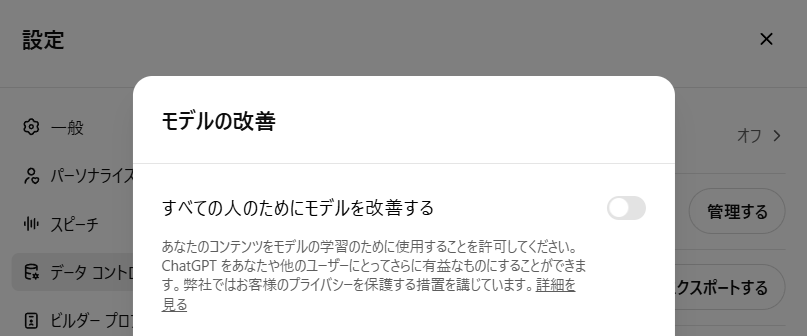
If you use ChatGPT via an API, the data will not be used for training, as described below. In other words, if a tool or software uses API integration to connect with ChatGPT, confidentiality of the input data will be maintained when you use the translation function of ChatGPT via that software or tool.
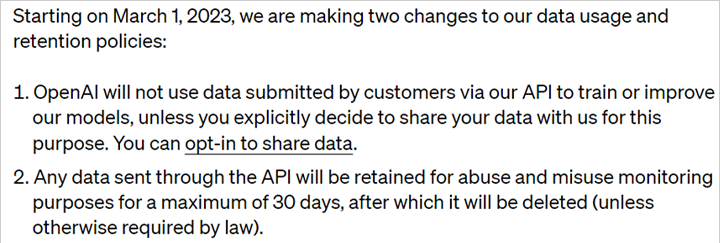
(Source: https://openai.com/policies/api-data-usage-policies)
8. Frequently Asked Questions About AI Utilization in PDF and File Translation
- QWhen uploading a PDF to ChatGPT for translation, the layout inevitably gets disrupted. Is there any trick to prevent this?
- QIs it okay to upload and translate confidential agreements (NDAs) and drawing PDFs from business partners on free AI translation sites?
- QWhich is ultimately better as a translation tool: generative AI (such as ChatGPT) or traditional machine translation (such as DeepL)?
- QCan AI translate not only English but also multilingual PDF materials from Chinese and various Asian countries?
9. Summary
ChatGPT is an AI chat service released by OpenAI that can converse like a human and also translate text. It can translate documents such as Word, Excel, and PowerPoint files, PDFs, and emails into specified languages. Its translation accuracy is comparable to dedicated automatic translation services, and ChatGPT even excels in certain fields. However, human confirmation is necessary due to potential mistranslations or omissions. Additionally, users must exercise caution, as the default setting uses input data for ChatGPT's training. Thunkfully, by using an API, data confidentiality can be ensured.
Our company offers an automatic translation product, MTrans for Office, with OpenAI's API integration. By using the API, you can utilize the translation function of ChatGPT without the risk of information leaks. With MTrans for Office, you can call OpenAI from Word, Excel, PowerPoint, and Outlook with just one click, to translate, proofread, or transcribe English emails. You can also create your own prompts. Try the quality and usability of MTrans for yourself with our 14-day free trial offer.
Features of MTrans for Office
① Unlimited number of translatable files and glossaries with a flat-rate plan
② One-click translation from Office products!
③ Secure API connection for peace of mind
・For customers seeking further enhancement, SSO and IP restrictions are also available
④ Support in Japanese by a Japanese Company
・Support for security check sheets is also available
・Payment by bank transfer is available
MTrans for Office is an easy-to-use translation software for Office.























 Return to the top of the page

 +81 35-321-3111[Tokyo Headquarters]
  Contact Us
 Request for Information