


 Text Annotation
 Audio Annotation
 Image & Video Annotation
 Generative AI, LLM, RAG Data Structuring
 AI Model Development
 In-House Support
 For the medical industry
 For the automotive industry
 For the IT industry
 For the manufacturing industry


Table of Contents
- 1. Introduction
- 2. Created Handwritten Forms for Verification
- 3. Transcribing to Excel Manually
- 4. Tried OCR with ChatGPT
- 5. ChatGPT Interpreted Not Only “Characters” but Also “Structure”
- 6. OCR AI Is Not “Fully Automated”
- 7. Summary
- 8. Human Science Teacher Data Creation, LLM RAG Data Structuring Outsourcing Service
1. Introduction
In recent years, advanced AI applications such as generative AI and agent AI have attracted significant attention. When seeing examples of work efficiency improvements using cutting-edge technologies like agent AI, it is natural to feel compelled to implement them in one’s own company as well.
On the other hand, in actual work sites,
・Paper forms remain
・Handwritten information is manually transcribed into Excel, etc.
・Data is not digitized in the first place
Such cases are not uncommon.
From the field perspective, it often feels like a realistic challenge is "how to proceed with digitizing and organizing existing operations before tackling AI utilization or DX."
This time, I had the opportunity to work on a task involving "transcribing handwritten tabular PDFs into Excel."
The task itself is simple, but as the number of forms increases, the input workload grows significantly, and including the verification process, it becomes quite a burden.
To be honest, I felt that "there might still be surprisingly many such paper-based operations even now."
Of course, I do not know the detailed background as to why paper-based operations were adopted in this particular case.
However, in fields such as manufacturing and healthcare, where many of our clients are involved, we have heard that it is not uncommon for paper-based forms and blueprints to still be used on-site. If even part of this could be digitized, it might reduce the workload. On the other hand, if the digitization process itself becomes a burden, that would be counterproductive.
So this time, we decided to examine how much this transcription work can be streamlined using generative AI by testing it with a sample.
Ideally, it might be preferable to use dedicated OCR applications or AI OCR services for transcription tasks. However, this time, we deliberately did not use any specialized OCR tools and tried to see how far we could handle it using only ChatGPT.
This is because when ChatGPT first appeared, it was perceived as an AI specialized in text, such as generating and summarizing sentences, but it is now considered to have evolved into a more versatile AI tool that also supports the following and more.
・Image Recognition
・Image Generation
・Table Data Understanding
・Code Generation
Also, without the hassle of installing specialized OCR apps and configuring various settings, the ease of preparing images and progressing with tasks by entering prompts in your own words may be suitable as a first step for those who have not yet ventured into utilizing generative AI.
So this time,
"To what extent can using ChatGPT reduce the workload of paper data entry?"
From this perspective, we actually tested it using handwritten forms.
Reference blog:
Can ChatGPT do annotation? Follow-up – Trying tagging with the latest ChatGPT in 2025
Can ChatGPT do annotation?
2. Created Handwritten Forms for Verification
This time, we created a sample form for verification purposes. While it is possible to have ChatGPT generate a handwritten-style form, that might make it a 'fixed race.' So, this time, the author actually created it by hand.
The subject chosen was tabular data modeled after a fare table.
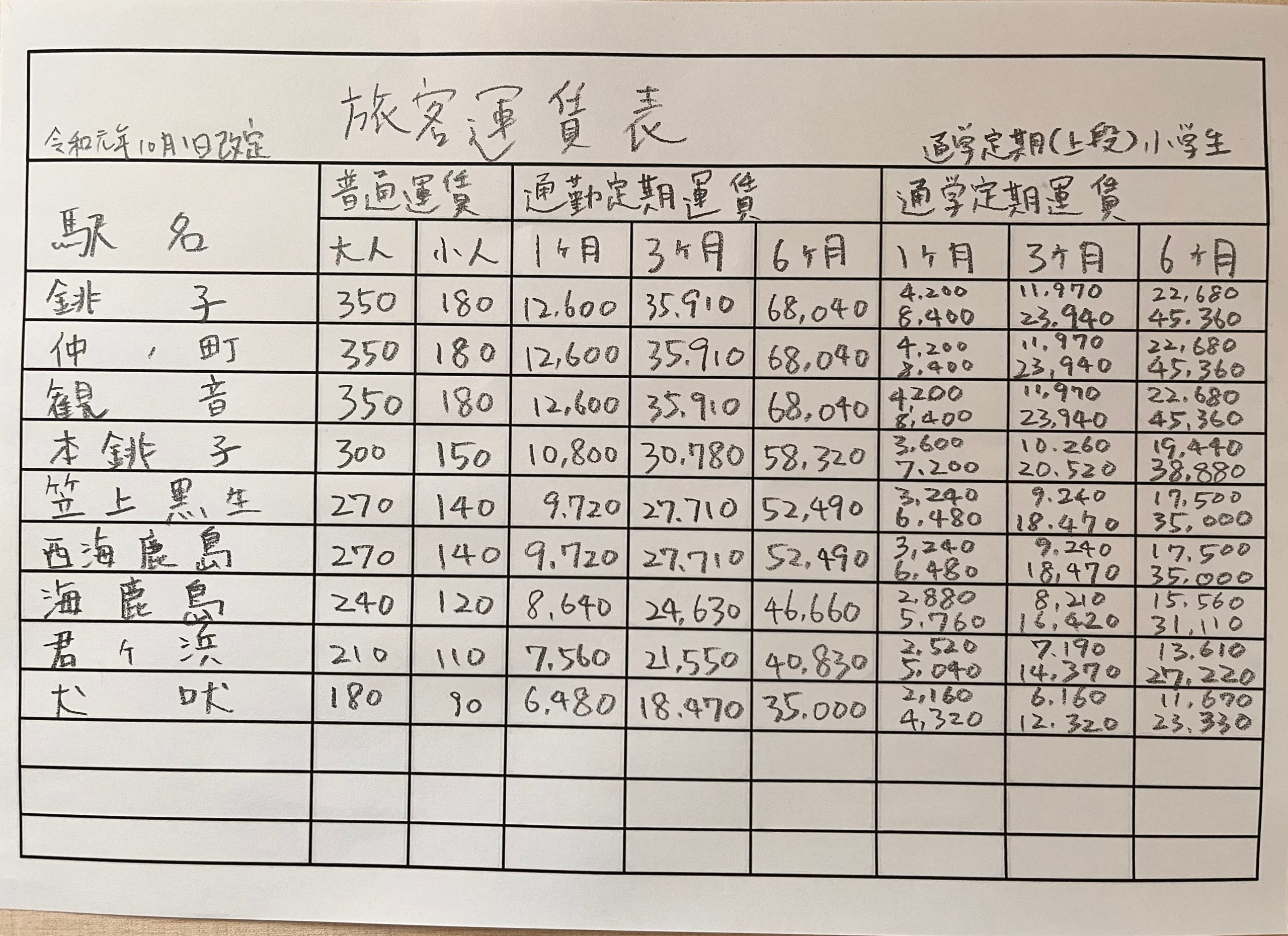
This form includes the following elements, making it a structure that is likely to present some challenges in OCR accuracy.
・Handwritten characters
・Numerical values such as fares
・Detailed table structure
・Multiple lines of information within a single cell
Additionally, assuming conditions close to an actual field environment, the following adjustments were also made.
・Allow some variation in the entry position within the cell
・Use cursive handwriting
・Photograph the form with a smartphone
In OCR verification, we believe it is important to evaluate not using perfectly neat samples, but including the "difficulty in reading that is likely to occur in actual field conditions."
Reference blog:
What is AI OCR? — Differences from Traditional OCR and 3 Use Cases
3. Transcribing to Excel Manually
First, as a point of comparison, the author personally transcribed the forms into Excel. The author can touch type but is not particularly fast and does not perform data entry tasks regularly. Please keep this context in mind when considering the results.
The results are as follows.
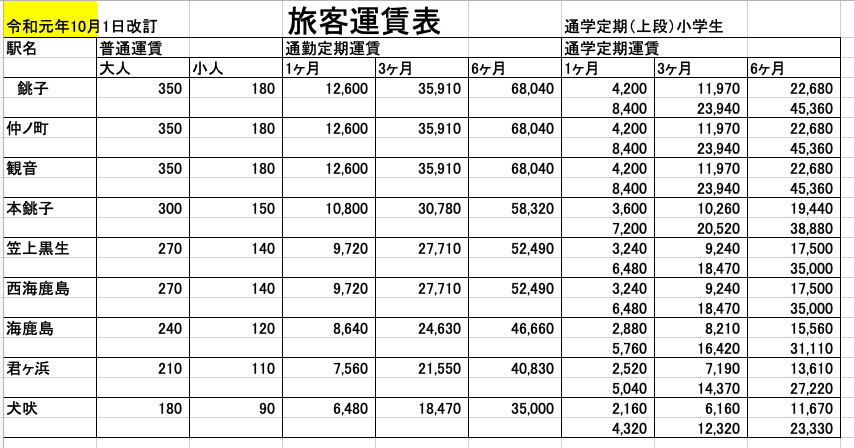
・Data entry work: about 11 minutes
・Verification work: about 3 minutes
・Number of corrections: 1
There was one correction: where it should have been "revision", it was written as "amendment".
From my actual experience, the data entry itself is time-consuming, but the verification work of cross-checking the original document and the Excel numbers while entering data seemed to take more time.
Especially with handwritten characters, detailed verification tasks such as checking for misreading numbers or errors in input cells continuously occur.
At first glance, it seems like a simple transcription task, but when done for long periods, it requires concentration and the human workload is by no means small. To be honest, even this single sheet is quite tiring.
This time, the task involved only this one sheet, but if it were to be several hundred sheets, the work would take tens of hours, so it is not hard to imagine how difficult the task would be.
4. Tried OCR with ChatGPT
Next, I uploaded the same form image to ChatGPT and had it output in Excel format.
The prompt used was very simple.
"Please read this fare table image and output it to Excel."
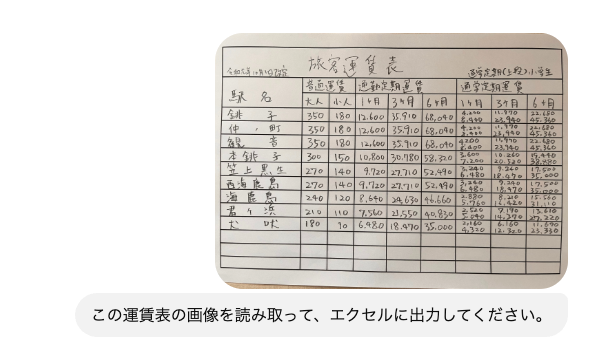
After about 20 seconds, the following Excel file was output.
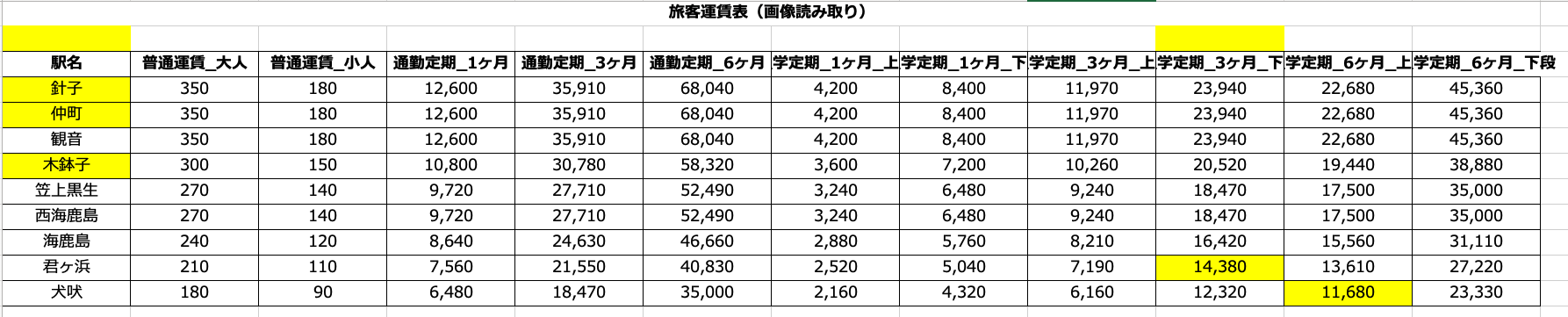
・Prompt input: about 10 seconds
・Output time: about 20 seconds
・Verification work: about 3 minutes
・Number of corrections: 7 places
Naturally, some misrecognitions have occurred. The yellow cells indicate parts where the characters were incorrect or could not be read.
In particular, the following misreadings were observed.
・Numbers with similar shapes
・Small characters
・Characters near grid lines
・Fine annotations
As actual examples of misrecognition, there were cases where a section originally written as "Choshi" was recognized as "Hariko." Additionally, there were two instances where the number "7" was misrecognized as "8."
In handwritten characters, slight differences in handwriting or the way lines connect can cause the AI to interpret them as different characters.
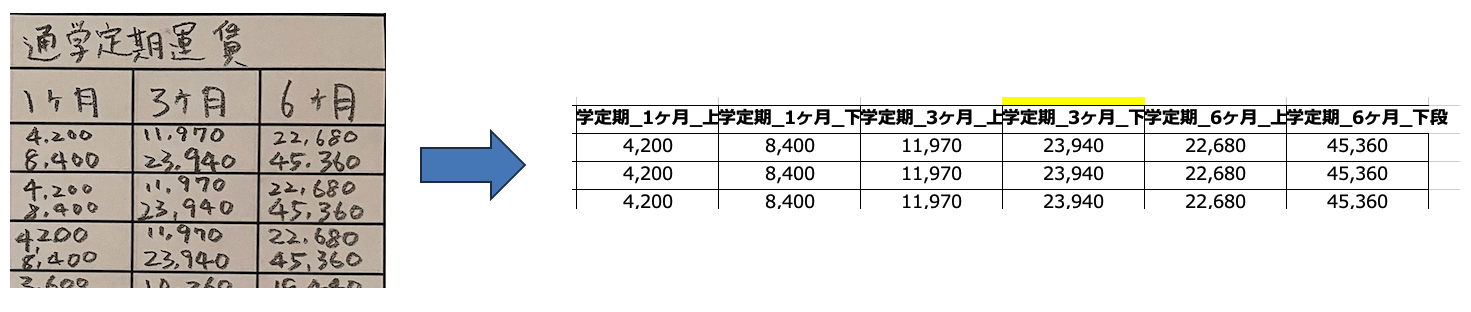
Another interesting point is that, compared to the original document where two fares are listed with a line break within a single cell, the table structure created a new column to cover the information in a different format, or the header names were different—these are cases where "the meaning is not incorrect, but the information of the table itself has changed." This will be discussed in the next chapter.
5. ChatGPT Interpreted Not Only “Characters” but Also “Structure”
What was particularly interesting in this verification was that ChatGPT not only recognized characters as a simple OCR but also interpreted the "table structure" itself.
For example, fare information that was written in two lines within one cell in the original document was independently split and output into separate columns by ChatGPT. From the perspective of "reproducing the original appearance exactly in Excel," this might be a point of differing evaluations.
In fact, when the goal is to reproduce forms, layouts that prioritize visibility—such as merging cells to group multiple pieces of information together—can be important in some cases.
However, as is, converting data into formats like CSV for database use can often make processes such as searching, aggregation, and system integration more difficult. From this perspective, having the AI split and organize information when outputting, as in this case, offers the advantage of a cleaner row data structure that is easier for subsequent systems to handle.
Not simply whether the "OCR accuracy is high," but also whether it can be "converted into a form that is easy to handle as data"
This perspective may also become important in future AI OCR.
6. OCR AI Is Not “Fully Automated”
In this verification, ChatGPT alone was not able to completely and accurately convert the data. Final confirmation and corrections require human intervention. Therefore, I feel that it is not a matter of "introducing OCR AI will eliminate the need for humans." However, I also felt that the effect of reducing the process of humans inputting data from scratch is very significant.
In fact, in this verification,
・Data entry → AI
・Verification → Human
This represents a division of roles close to reality. This is considered very effective as a practical operation. Especially in workplaces where a large volume of paper forms exist, even just having "humans focus on verification and leaving the data entry itself to AI" can lead to significant operational improvements. In this verification, the total workload was reduced to approximately one-quarter. If this were hundreds or thousands of forms, it is quite possible that "the transcription work that used to take 4 weeks could be shortened to about 1 week."
Reference blog:
Annotation in the Era of Generative AI: Areas That Can and Cannot Be Automated
7. Summary
This time, we tested OCR of handwritten forms using ChatGPT. Of course, there are still misrecognitions at this stage, and full automation has not been achieved.
However, we clearly saw the potential to significantly reduce manual input work and to understand table structures for output, organizing data into a form that is easier to utilize.
When it comes to generative AI, text generation and chat functions tend to attract attention, but in reality, "digitizing paper data" is also a very practical area of application. Especially in workplaces where paper culture still remains,
"Before introducing AI, first put the data into a state where it can be handled"
There are many cases where this very process becomes important. When it comes to utilizing generative AI, advanced AI systems and automation tend to attract attention. However, in reality, the process of "first putting the information written on paper into a state where it can be handled as data" may be the very first challenge faced in many workplaces.
8. Human Science Teacher Data Creation, LLM RAG Data Structuring Outsourcing Service
Over 48 million pieces of training data created
At Human Science, we are involved in AI model development projects across various industries, starting with natural language processing, including medical support, automotive, IT, manufacturing, and construction. Through direct transactions with many companies, including GAFAM, we have provided over 48 million high-quality training data. We handle a wide range of training data creation, data labeling, and data structuring, from small-scale projects to long-term large projects with a team of 150 annotators, regardless of the industry.
Resource management without crowdsourcing
At Human Science, we do not use crowdsourcing. Instead, projects are handled by personnel who are contracted with us directly. Based on a solid understanding of each member's practical experience and their evaluations from previous projects, we form teams that can deliver maximum performance.
Generative AI LLM Dataset Creation and Structuring, Also Supporting "Manual Creation and Maintenance Optimized for AI"
We support not only labeling for data organization and training data creation for identification-based AI, but also the structuring of document data for generative AI and LLM RAG construction. Since our founding, manual production has been our main business and service, and we now also provide support for "organizing business knowledge and manualization toward future generative AI and RAG introduction and utilization." We offer optimal solutions leveraging our unique expertise deeply familiar with the structure of various documents.
Secure room available on-site
Within our Shinjuku office at Human Science, we have secure rooms that meet ISMS standards. Therefore, we can guarantee security, even for projects that include highly confidential data. We consider the preservation of confidentiality to be extremely important for all projects. When working remotely as well, our information security management system has received high praise from clients, because not only do we implement hardware measures, we continuously provide security training to our personnel.
In-house Support
We provide staffing services for annotation-experienced personnel and project managers tailored to your tasks and situation. It is also possible to organize a team stationed at your site. Additionally, we support the training of your operators and project managers, assist in selecting tools suited to your circumstances, and help build optimal processes such as automation and work methods to improve quality and productivity. We are here to support your challenges related to annotation and data labeling.








































































 Return to the top of the page
 +81 35-321-3111[Tokyo Headquarters]
  Contact Us
 Request for Information
 TOP
TOP SITE MENU