




The latest automatic translation service, DeepL, is attracting attention. This article focuses on how helpful DeepL is for translating academic papers, explaining its accuracy and points to note. Additionally, it introduces efficient ways to read papers using OpenAI's ChatGPT and Microsoft's Copilot.
- Table of Contents
-
- 1. What are the characteristics of paper translation?
- 1-1. Features of Paper Translation
- 1-2. Differences from General Text Translation
- 1-3. Examples of Phrases and Expressions Specific to Certain Fields
- 2. Four Key Points for Choosing Paper Translation AI Tools
- 3. Comparison Table of Recommended Major AI Tools for Paper Translation
- 4. Procedures and Accuracy of Translating English Papers with DeepL
- 5. How to Efficiently Read English Papers
- 5-1. Uploading Files to ChatGPT
- 5-2. Accessing URLs with ChatGPT
- 5-3. Accessing web pages with Microsoft Edge browser
- 6. Prevent PDF Layout Collapse! Recommended AI Translation Tools for Reading with Parallel Text
- 7. Three Precautions When Using AI Automatic Translation Tools
- 8. Proofreading and Polishing Methods After Paper Translation
- 9. Frequently Asked Questions (FAQ) About Paper Translation AI
- 10. Summary
1. What are the characteristics of paper translation?

1-1. Features of Paper Translation
Translation of academic papers is considered to be more challenging compared to general translation. The reason for this is that academic papers often contain many specialized elements and content. In general translation, it is common to deal with everyday conversations or general texts, so as long as one has relatively good translation skills, it can be done without issues. However, academic paper translation requires a deep understanding of specific academic fields and specialized knowledge.
Academic papers summarize research results and scholarly discussions, and their content requires a high level of expertise. For example, in papers from fields such as medicine, engineering, and economics, specialized terms and concepts frequently appear. A high level of expertise is necessary to accurately understand and appropriately translate these specialized terms and concepts.
In addition, attention must be paid to style and expression in paper translation. Academic papers are scholarly documents and have characteristics that differ from general writing. For example, objective expression may be required in papers. Furthermore, there are specific rules and formats, such as logical development and proper handling of citations, that are unique to academic papers. To translate these elements appropriately, it is necessary to be familiar not only with translation skills but also with the characteristics of scholarly documents.
1-2. Differences from General Text Translation
Papers often use complex sentences and long phrases to address specialized content. This is because papers are academic documents intended to provide accurate and detailed information. In specialized fields, complex words and technical terms may be required to explain specific concepts or theories.
Papers may use specialized terminology or terms that have not yet been established. Terms that are not yet established may be used to represent new research or concepts, but their meanings and definitions may not be clear. Translators need to have specialized knowledge and research skills to properly understand these terms and convey them clearly to the reader.
Translation of academic papers requires advanced skills and knowledge from translators, as they deal with specialized content and complex expressions. Translators must accurately understand the intent and context of the original text and appropriately translate technical terms. Additionally, flexibility and research ability to adapt to new terms and concepts are also necessary.
1-3. Examples of Phrases and Expressions Specific to Certain Fields
In translating papers in the medical and pharmaceutical fields, it is important to accurately translate expressions specific to the field. When expressing susceptibility to diseases, the Japanese phrase "~しやすい" is translated into English using terms such as be predisposed to, be prone to, or be susceptible to, depending on the context. For example, "高齢患者は感染症にかかりやすい" is expressed as “Elderly patients are more susceptible to infections.”
In describing symptoms, it is common to use medical expressions such as "present with" or "exhibit" to convey "~を呈する." For example, "The patient presented with acute symptoms" is used to mean the patient showed acute symptoms. Additionally, when describing treatment effects, phrases like "demonstrate efficacy" or "show effectiveness" are used to translate "有効性を示す," as in "The drug demonstrated significant efficacy."
Statistical expressions are also indispensable in medical papers. "Statistically significant" is indicated as statistically significant (p<0.05), and "correlate" is expressed using be correlated with or show correlation. By appropriately using these standard expressions, you can produce high-quality English that is well regarded by reviewers.
2. Four Key Points for Choosing Paper Translation AI Tools

With the numerous AI translation tools available today, choosing based solely on popularity can lead to failures such as PDFs becoming unreadable due to layout collapse or security breaches. To comfortably carry out paper translation, select tools based on the following four points.
1. High Translation Accuracy
The most important requirement in paper translation is, needless to say, accuracy. In particular, the key point is whether the tool can translate specialized terms mentioned above and complex logical structures such as double negatives and modifier relationships by understanding the context rather than translating literally. In recent years, accuracy has dramatically improved due to the rise of neural machine translation (NMT) and large language models (LLM).
2. Supported File Formats and Layout Reproducibility
The majority of academic papers are distributed in PDF format. Therefore, it is extremely important to be able to upload PDF files directly and translate them without disrupting the layout. With common tools, dragging and dropping a PDF can cause two-column layouts to break apart and figures or tables to be displaced far away on the page. Choosing a tool that outputs while preserving the original placement of figures and tables greatly improves reading efficiency.
3. Customization Function for Technical Terms
AI tools sometimes make errors by translating words in their general meanings rather than in the context of their specific technical fields. For example, the term "Transformer" in physics or information engineering might be incorrectly translated as "transformer" (electrical device). Tools that offer a glossary or dictionary function allowing you to pre-register "translate this term in this way" become extremely powerful allies in academic paper translation.
4. Security Policy
When translating unpublished research data or confidential papers under joint research, security is the top priority. Many free automatic translation tools state in their terms of use that the input data may be reused to improve AI machine learning models. To prevent information leaks, it is essential to choose paid plans where data is not stored or used for learning on servers, or secure tools equipped with API connections.
3. Comparison Table of Recommended Major AI Tools for Paper Translation
As of 2026, we have thoroughly compared the capabilities of major paper translation tools based on the four criteria mentioned above.
| Tool Name | Translation Accuracy Trends | PDF Layout Preservation | Confidentiality (Security) |
Key Features and Uses |
|---|---|---|---|---|
| MTrans for Office | Extremely High | Excellent | High (API connection) | Flat-rate unlimited use with one click from Office products |
| DeepL | Extremely High | Average | The paid Pro version is expensive. The free version allows learning usage. |
The de facto standard for English academic paper translation. The fluency of the translated text is the best in the world |
| ChatGPT/Copilot | Expensive | Not supported | API/Enterprise version is expensive. Free/Standard versions allow learning use. |
Not only translation, but also summary and explanation of questions can be done in a conversational format |
| Immersive translation | Expensive | Extremely excellent | Depends on the policy of the connected engine | Browser extension. The definitive version of side-by-side bilingual display showing original and translated text |
| PDFelement | Expensive | Excellent | Free; trial version has some limitations | PDF editing software. Recognizes text (OCR) and translates even scanned image PDFs |
| Google Translate | Average | Low | Free version may be used for learning purposes | Completely free and supports over 100 languages including rare languages |
4. Procedures and Accuracy of Translating English Papers with DeepL

DeepL, an AI translation service developed in Germany in 2017, has gained overwhelming support from many researchers and students due to its exceptionally natural and easy-to-read translation quality. It is available online for free, but since there are limitations, you need to choose a paid plan if you want to use the full features. For more details about DeepL and the differences between its free and paid versions, please see the articles below.
What is DeepL? A Comparison with ChatGPT
What's the Difference between DeepL's Free Version and Paid Version (DeepL Pro) – Pricing, Security, Character Count
Is DeepL Strong in Translating Academic Papers?
DeepL incorporates deep learning technology modeled on the brain's mechanisms, allowing it to read the context before and after very precisely. Even for complex sentence structures like those in scientific and technical papers, it can generate very smooth Japanese that seems as if translated by a specialist, making it overwhelmingly popular as a support tool for paper translation.
Translation Accuracy When Using DeepL for Academic Papers
DeepL excels in its ability to translate natural and fluent text. It can provide high accuracy in translating general texts and documents with few technical terms. However, there is a challenge in achieving accurate translations for papers that contain a lot of specialized terminology.
Especially in medical translation, the abundance and complexity of specialized terminology pose challenges. However, evaluations by Human Science indicate that DeepL has demonstrated the highest translation accuracy in both English-Japanese and Japanese-English compared to Google, Amazon, and Microsoft. It is important to note that, like other machine translations, DeepL also has issues with mistranslations and omissions. Therefore, after performing machine translation, human verification and correction (post-editing) are necessary. For more details on DeepL's translation accuracy in medical translation, please refer to the articles below.
What is the translation accuracy of DeepL in medical translation? Comparison results with Google/Microsoft/Amazon
Has the accuracy of medical translation improved - Comparing DeepL and Google Translate, 2020 and 2023
DeepL can currently play a supportive role in translating academic papers. While it may lead to time savings, it is important to keep in mind that verification is necessary for documents with many technical terms.
Steps to Translate Academic Papers with DeepL
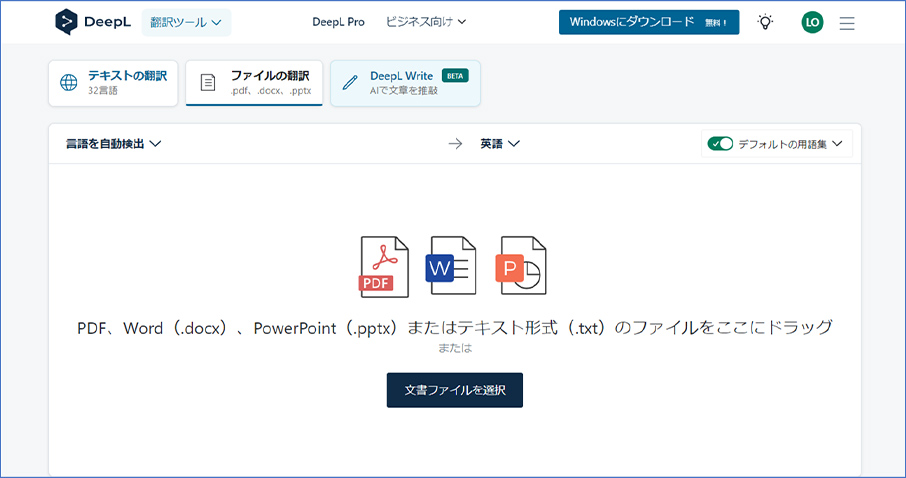
1. Open the DeepL file translation page in your web browser (https://www.deepl.com/translator/files).
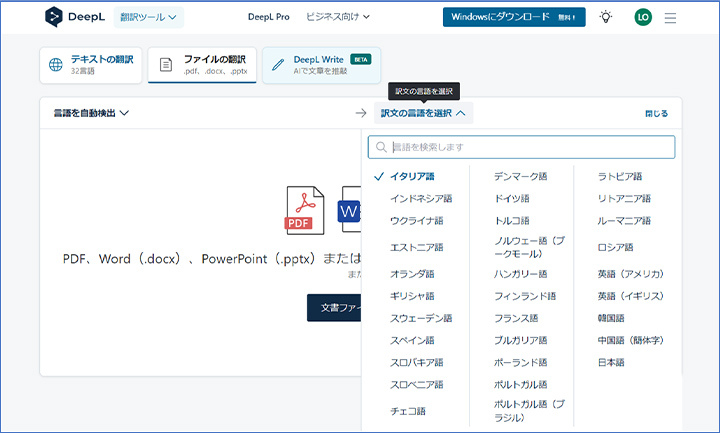
2. Click the language selection button on the right to choose the language after translation.
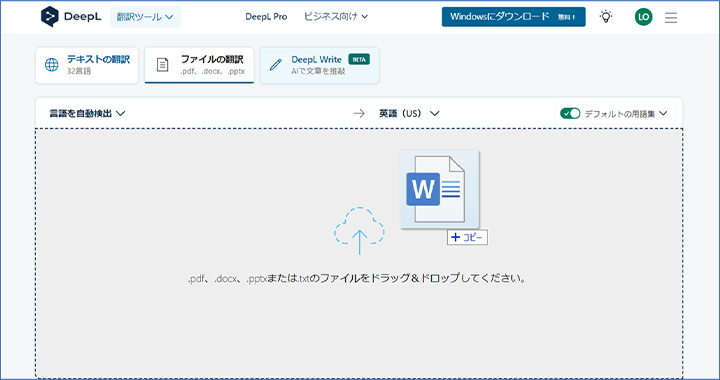
3. Drag and drop the file to be translated.
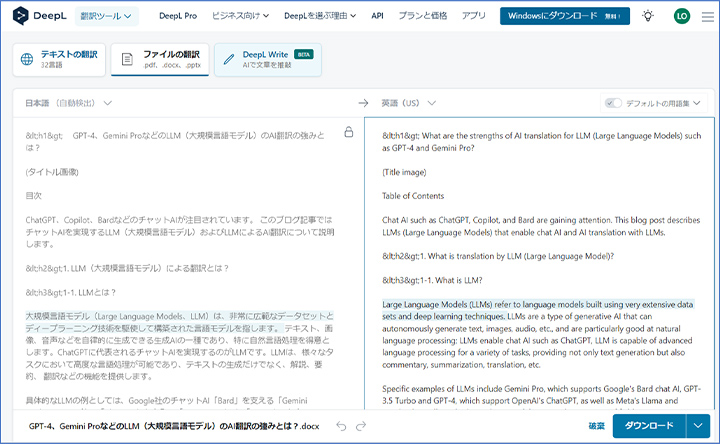
4. DeepL will translate the file. After that, if you are using the free version of DeepL, you can download the translated file. If you are using the paid version, an editing screen will be displayed in the browser (see the image below). After reviewing and making corrections to the translation, you can click the download button in the bottom right to download the translated file.
5. How to Efficiently Read English Papers

With ChatGPT, you can upload files and access URLs. Additionally, Microsoft Edge browser's Copilot uses generative AI equivalent to ChatGPT to summarize web pages. By utilizing these features, you can read English papers in a short time and efficiently gather the information needed for your research. This section explains the steps to summarize English papers using each service and output the results in Japanese.
5-1. Uploading Files to ChatGPT
1. Access ChatGPT (https://chatgpt.com/) using a web browser.
2. Drag and drop the file to upload it.
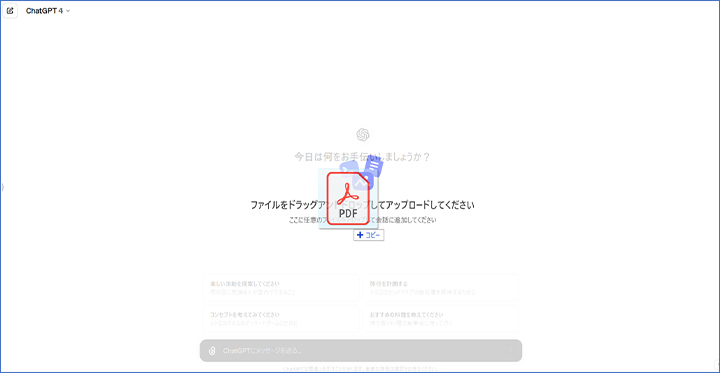
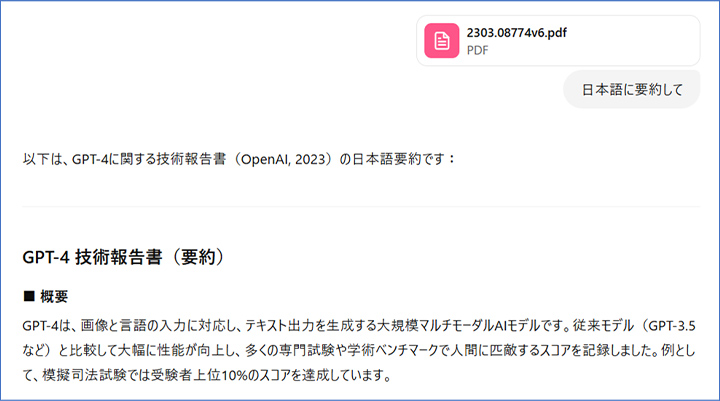
3. Type "Summarize in Japanese" and press the Enter key. ChatGPT will read the contents of the file and output a summary.
5-2. Accessing URLs with ChatGPT
1. Access ChatGPT (https://chatgpt.com/) using a web browser.
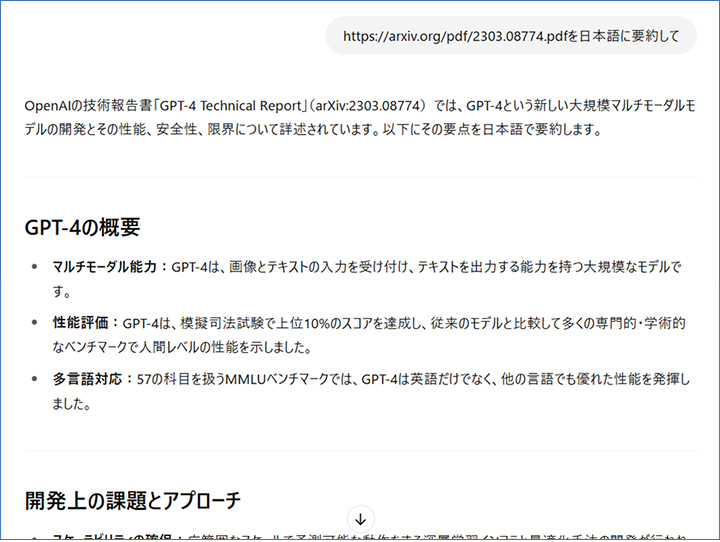
2. Type "Summarize <URL> in Japanese" and press the Enter key. ChatGPT will access the specified URL and provide a summary.
5-3. Accessing web pages with Microsoft Edge browser
1. Access the URL of the paper you want to translate using the Edge browser.
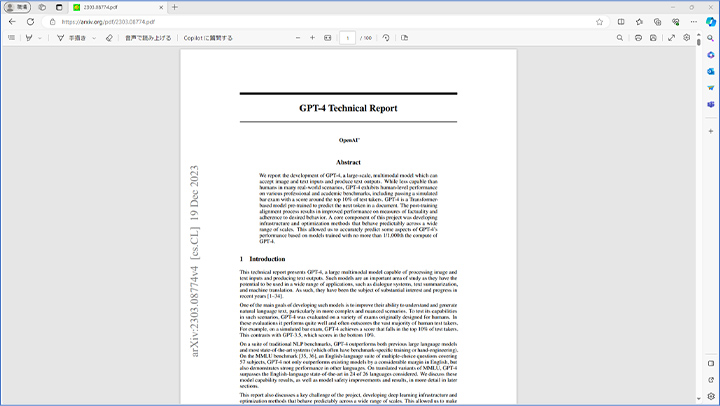
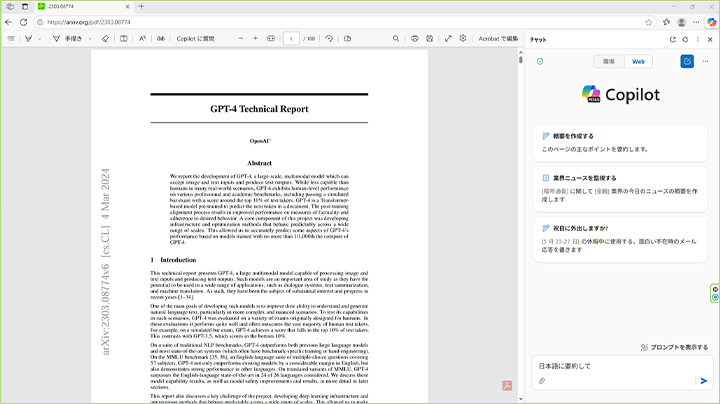
2. Click on the "Ask Copilot" button in the toolbar. A chat window will appear on the right side of the screen.

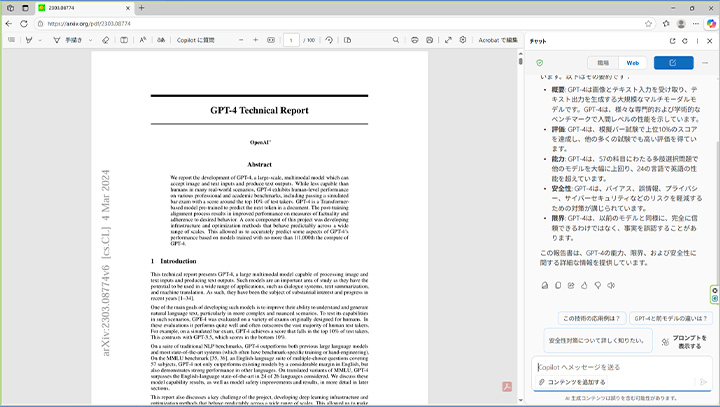
3. If the "Workplace" button and the "Web" button are displayed at the top of the chat screen, select "Web" first, then enter "Summarize in Japanese" in the text box at the bottom and press the Enter key.
4. Copilot summarizes and outputs the content of the page.
6. Prevent PDF Layout Collapse! Recommended AI Translation Tools for Reading with Parallel Text

Introducing two of the most notable tools currently available that solve common issues faced by many researchers, such as broken two-column layouts in PDFs and mysterious line breaks causing translation errors, and enable smooth reading of papers with side-by-side (original and translated text) display.
・PDFelement
Wondershare's "PDFelement" is an all-in-one software that integrates advanced AI translation engines in addition to PDF viewing and editing functions.
・Side-by-side (parallel) display: When you load a PDF and execute the translation, it displays the original text and the translated Japanese side by side (spread view). This allows you to follow the translation while immediately checking the English text of any sections of interest right next to it, minimizing the risk of misreading.
・Powerful OCR (Optical Character Recognition) Function: Scanned PDFs of old academic journals and image-based papers usually cannot even be copied and pasted, but the OCR function built into PDFelement instantly extracts the text and translates it with high accuracy.
・Procedure: Open the paper with the software, select "PDF Translation" from "AI" > "AI Translation" in the sidebar, check the option for two-page spread display, and simply execute to complete.
・Immersive Translate
As of 2026, this is a browser extension tool used by over one million users worldwide. It translates online papers (HTML) and local PDF papers into Japanese while maintaining overwhelming visual fidelity.
・Perfect Layout Preservation (Reproduction Rate Over 95%): It almost perfectly recognizes the positions of two-column paper formats, complex equations, charts, chemical formulas, and more, embedding the translated text without breaking the original structure. Actual verification shows that the layout reproduction rate exceeds 95%.
・Bilingual Side-by-Side Display: You can insert the Japanese translation immediately below the original text (English on top, Japanese below), or display the two languages side by side with a single click.
・AI Automatic Removal of Unnecessary Line Break Codes: Mysterious line breaks at the end or in the middle of sentences that occur when copying and pasting from PDFs are automatically detected and removed by an internal algorithm. This prevents fragmented translations and outputs logically coherent, beautiful Japanese.
・Multi-engine + Glossary: You can freely switch between AI engines such as DeepL, OpenAI, and Gemini, and by applying an original glossary (dictionary) specialized in your field of expertise, you can perfectly prevent mistranslation of technical terms.
7. Three Precautions When Using AI Automatic Translation Tools

AI translation tools that revolutionize research activities can sometimes lead to serious troubles or losses if used incorrectly or if the wrong tool is chosen. Let’s understand the three pitfalls when using them.
・Mistranslation of technical terms or substitution with common words
AI learns from vast amounts of data, but it lacks sufficient training data for highly niche fields, the latest academic concepts, and specialized terminology used only in specific laboratories. As a result, it may translate specialized terms by replacing them with completely different common words, causing the overall logic of the text to collapse. It is essential never to take AI output at face value and always maintain a critical perspective.
・Misunderstanding of complex contexts and the core parts of arguments
Especially in humanities papers such as literature and social sciences, sentences with multiple layers of subtle metaphors, irony, and subjunctive mood can be misinterpreted by AI, resulting in a translated text that outputs the exact opposite conclusion. When you doubt whether this conclusion is really correct, make it a habit to interpret the original sentence structure and cross-check it for verification.
・Protection of Confidential Information and Risk of Information Leakage
This is the most serious risk for researchers and companies. General free automatic translation services such as Google Translate (free version) and ChatGPT (free version) may have terms that allow PDFs sent by users or copied and pasted thesis texts to be stored and reused on external servers as machine learning data to improve AI quality. Using free tools to translate unpublished joint research data, papers related to intellectual property rights (patents), or confidential project data is a serious violation of security policies. Always select paid services that guarantee confidentiality or tools that use secure API connections not utilized for learning.
8. Proofreading and Polishing Methods After Paper Translation

One effective method for proofreading after thesis translation is "review." This involves the translator themselves or a third-party expert rechecking the translated text to verify contextual consistency, the use of technical terms, and the appropriateness of paraphrasing. During the review, subtle nuances that are often overlooked during translation and unnatural expressions can be identified, enabling the accurate conveyance of the original thesis's intent. In particular, reviews conducted by translators with specialized knowledge are highly effective in refining the text while maintaining content accuracy.
Next, "native check" is the process where a native English speaker verifies whether the translated text is natural and easy to read. This mainly involves checking for grammatical errors, unnatural vocabulary, and appropriate punctuation. This step is especially important when the paper is intended for publication in international academic journals, as it ensures smooth expressions that do not cause stress to the reader. However, since native speakers are not always experts in the specific field, attention must be paid to the accuracy of the content. In some cases, a double check by a proofreader with specialized knowledge is desirable.
Finally, gaining attention in recent years is proofreading using "LLM (Large Language Models)", that is, generative AI. By using tools like ChatGPT, you can quickly refine a large amount of text into natural English and unify terminology. These models possess extensive contextual understanding and expressive capabilities, allowing them to suggest revisions tailored to the style of academic papers. Additionally, they are efficient in terms of cost and time, greatly contributing to quality improvement at the draft stage. However, final verification by humans is essential for fact-checking and the accuracy of detailed technical terms. It is advisable to use AI output as a supplementary tool rather than accepting it uncritically.
[Related Links]
Translation Proofreading – How to Achieve High-Quality Translations
9. Frequently Asked Questions (FAQ) About Paper Translation AI
- QIs it safe from a security perspective to upload papers to free AI translation tools (such as the free version of DeepL or ChatGPT)?
- QWhat are the causes and countermeasures for layout distortion and garbled text when translating academic paper PDFs?
- QIs it possible to create and peer-review academic papers using only AI translation?
- QHow can we efficiently perform not only simple translation of papers but also summarization and extraction of specific data?
- QWhat specific points should be paid attention to during post-editing (manual correction) after machine translation?
- QShould AI translation tools be used differently for science and engineering fields (such as medicine and IT) and humanities and social sciences fields (such as humanities and sociology)?
10. Summary
Translation of academic papers requires specialized knowledge and terminology, making it more challenging than the translation of general texts. DeepL has received high praise for its translation of scientific and technical papers, excelling in its ability to generate natural and fluent text. However, there are also concerns about the risk of mistranslations and omissions in documents with a lot of technical terms. Therefore, human review and correction after translation are necessary. Nevertheless, tools like DeepL, ChatGPT, and Copilot are extremely useful for researchers and students in efficiently gathering information.
At Human Science, we offer the automatic translation software MTrans for Office and MTrans for Trados, which can utilize DeepL and ChatGPT. ChatGPT can be used not only as a translation engine, but also for transcription, rewriting, and proofreading, depending on the prompt. Try out MTrans for Office and MTrans for Trados with our 14-day free trial offer. Please contact us for more information.
Features of MTrans for Office
① Unlimited number of translatable files and glossaries with a flat-rate plan
② One-click translation from Office products!
③ Secure API connection
・For customers who want further enhancements, we also offer SSO and IP restrictions
④ Support in Japanese by a Japanese company
・Support for security check sheets is also available
・Payment by bank transfer is available
MTrans for Office is an easy-to-use translation software for Office.

Features of MTrans for Trados
- ① Simultaneous translation using multiple machine translation engines, such as DeepL and Google.
- ② Automatic application of specific terminology to machine-translated text. Centrally managed term glossaries, regardless of the machine translation engine
- ③ String replacement, regular expression replacement, and automatic correction of translation style, notation, and expressions using ChatGPT
- ④ Automatic revision of fuzzy matches in the translation memory
- ⑤ Preservation of the original formatting and tags during machine translation
What is the Trados-dedicated machine translation solution MTrans for Trados?
















 Return to the top of the page

 +81 35-321-3111[Tokyo Headquarters]
  Contact Us
 Request for Information