

Considering the Use of Generative AI in Business—Trying It Out for Blog Writing
Since the emergence of generative AI in 2023, various discussions have been held on how to utilize generative AI in text-related areas such as writing, translation, and editing. Because generative AI can easily create and summarize text, it is expected to contribute to improving work efficiency. We also thought that generative AI might be useful for manual creation, so we decided to first try it out by using it for writing blogs posted on our company’s website.
However, when we actually used it, we encountered challenges such as "It didn’t work as well as we thought!" Therefore, this time, we will introduce the process of creating blogs using generative AI and the trial-and-error process toward utilizing generative AI in business.
Considering Where to Use Generative AI in Blog Writing
First, we organized the general process of writing a blog, and then examined which steps generative AI could be utilized in.
Below is an overview of our company's blog writing workflow.
1. Outline Confirmation and Adjustment:
In our company, the planner who creates the blog outline (blog title, summary, reference information) and the writer who drafts the main text are different people. In this process, the writer reviews the outline created by the planner and roughly considers what kind of manuscript to create and how to structure the flow of the story. In some cases, the outline itself may be adjusted.
2. Writing:
This is the process of drafting the blog article based on the outline. While incorporating the writer’s experiences and impressions, the content is expanded with the aim of creating an engaging blog that can be easily read during spare moments. Since the writing style is completely different from manuals, even experts in writing require considerable time.
3. Review:
This is the process of sharing the draft with internal stakeholders and having them review it. Reviewers check from perspectives such as whether there are any incorrect contents in the draft, whether the flow feels off, and whether it is written in an easy-to-read manner. Since the reviewers are also members involved daily in the manual production project, there are especially many comments regarding clarity and readability.
4. Adjustment:
This is the process of reflecting the review results in the draft and making adjustments. If necessary, a second review may also be conducted.
5. Submission:
The manuscript is submitted to the internal web page administrator.
Among these, I thought generative AI could be particularly useful in the "Outline Confirmation and Adjustment" and "Writing" stages.
I thought that if we gave commands like "Improve this outline" or "Write an article based on this outline" to generative AI, we could instantly get good results.
Next, I considered what kind of commands to give to generative AI, that is, the prompts.
Searching for Good Prompts
To use generative AI, instruction sentences called "prompts" are important. By using good prompts, you can generate outputs that better meet your expectations. So, first, I searched the internet using terms like "blog creation generative AI prompt" to find usable ones.
At that time, many pages titled "Prompt collections usable for ○○" were also widely published, so while searching for prompts for blog creation, I also looked broadly at those usable for seminar planning and newsletter creation... I entered the prompts I found into ChatGPT to have it generate blog title ideas, structure proposals, and drafts. At first glance, the output was more coherent than I expected, and at that moment, I felt, "Generative AI is amazing; this might be really useful!"
Also, during the process of considering prompts, I was able to leverage knowledge from manual writing.
In manual writing, it is required to create text that clearly conveys actions and can be understood in the same way by anyone who reads it.
When writing prompts, I was also able to be mindful of phrasing and expressions that clearly communicate our intentions to the generative AI. In the case of manuals, the readers are humans, but I realized that the knowledge gained from this work also applies to generative AI.
Furthermore, when we found good prompts, we also wrote them on the SharePoint site so that they could be shared with group members. It is not enough for only some members to be able to use generative AI; we believed it was also important to establish an environment for information sharing within the department and team.
Making Generative AI Easier to Use! Developing a Writing Assistance Tool
Our stance when considering the use of generative AI in business was "to use generative AI, not to be used by generative AI." If we proceed with generative AI utilization based on a specific tool, we might have to change our approach depending on that tool’s specifications or the tool vendor. This could ultimately lead to a situation where we are "used by generative AI."
Therefore, instead of purchasing generative AI tools or creating new workflows, we chose an approach that incorporates generative AI into the tools we are already familiar with and the existing business workflows. One example of this is the development of a writing assistance tool.
The writing assistance tool is a Google Docs plugin, with ChatGPT operating on the backend of this tool. This allows you to have generative AI write text directly within the familiar Google Docs environment. Although we broadly call this "writing assistance," we have prepared the following specific menu options.
・Create Title Proposals: Generate document title proposals from arbitrary keywords
・Create Structure Proposals: Generate document structure proposals from the document title
・Create Drafts: Generate document drafts from the structure proposals
・Detail Text: Make the text more detailed
・Simplify Text: Make the text more concise
・Proofread Text: Proofread the text and correct errors
・Rewrite: Change the text into different expressions
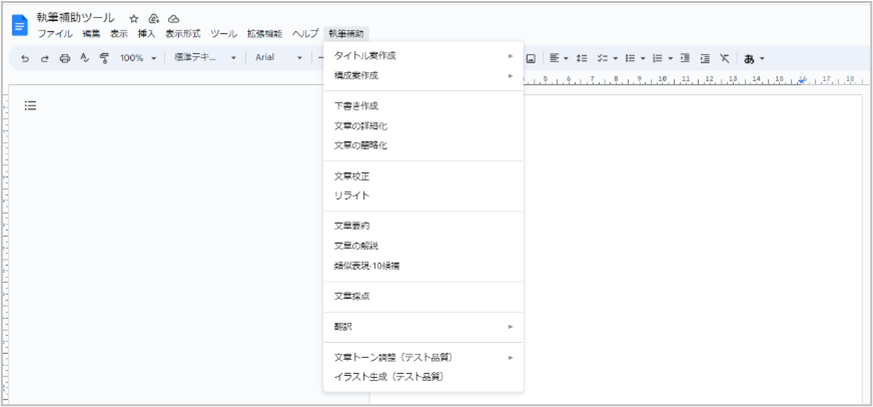
By turning commands to generative AI into a menu as shown in the above figure, not only can generative AI be used easily, but it also helped suppress variations in prompts by users. We consider the latter to be a particularly important perspective. When incorporating generative AI into business operations, we must avoid a situation where "only those with a knack for writing good prompts can skillfully use generative AI." Otherwise, even if we try to improve operations by introducing generative AI, the work will become dependent on those "people with a knack."
Also, as mentioned earlier, this tool was designed based on the principle of "using generative AI, not being used by generative AI," so the language model running on the backend can be switched to another at any time. If only a specific language model can be used, it might create a situation where we are "used by generative AI."
By using the familiar interface of Google Docs, users can work smoothly, and by maintaining the flexibility to replace the underlying technology with new ones, we aimed to continuously maintain the stance of "using generative AI."
Creating a blog article draft using the writing assistance tool
We incorporated the developed writing assistance tool into part of the blog creation process introduced at the beginning and actually created a draft for a blog article.
1. Reader Setting:
Using ChatGPT, we consider the target blog audience (persona).
2. Outline Review and Adjustment:
Input the persona considered in step 1 and the blog outline created by the contractor into ChatGPT, and have it suggest better blog titles and structures.
3. Drafting:
Transfer the content from step 2 into the writing assistance tool and use the "Create Draft" menu to produce a draft of the article. Review the output and make manual adjustments as needed. Here, you outline the general flow and overall picture.
4. Writing:
Continue writing the main text using the writing assistance tool. For the draft created in step 3, use the "Detailing the text," "Simplifying the text," and "Rewriting" menus to expand the content. Review the output and make manual adjustments as needed. In some cases, you may need to go back and revise the structure created in step 2.
5. Self-Check:
Use the "Proofreading" menu to correct typos and grammatical errors.
From this point onward, the internal review and submission follow the same process introduced at the beginning.
As a result of proceeding with blog writing using this new process, it initially took time due to research and trial and error, but once accustomed, we were able to write with less effort than before, and found the tool to be reasonably convenient.
However, at the same time, challenges in utilizing generative AI also became apparent. The most common issues were as follows.
・During the writing process, keywords necessary for SEO measures considered by the planner may be omitted.
・The quality of the output is inconsistent, and in some cases, humans have to make significant adjustments (for example, starting with raising an issue and expecting to end with presenting a solution, but instead discussing the problem throughout).
Summary so far: Generative AI is ultimately an "assistive tool"
Despite the challenges, utilizing generative AI allowed us to reduce the workload of blog writing to some extent. We have a feeling that by continuing to refine this approach, even greater benefits can be achieved in the future.
Through this attempt, we understood that generative AI is ultimately a tool to assist human work, and even in writing areas where it seems to be a good fit, it cannot completely replace human tasks. We tried writing several blogs using the new process, but in all cases, human review and correction were indispensable, and in some cases, we even thought, "In this case, it might be faster for a human to write from scratch."
In the next blog, we would like to introduce the challenges we encountered as we continued this effort and how we overcame them. Please be sure to also check out the sequel, What Are the Results of Optimizing Prompts and Role Allocation? A Case Study of Blog Creation Using Generative AI.